
The most convenient tax software may be the wrong fit for Form 5472. Before choosing a cloud based application for generating irs information return 5472, confirm it supports your entity and reporting situation, not just general business tax forms. A polished online workflow doesn’t prove it can handle related-party details or explain how the completed return reaches the IRS.
That uncertainty is reasonable. Form 5472 preparation can involve ownership information, related parties, and transaction records, while the filing method may depend on the entity. You also need to know how sensitive company and owner data is handled. Preparation, review, and submission are separate steps. Check each one.
This guide gives you practical criteria for comparing applications: workflow, required data, filing instructions, review controls, security disclosures, and entity fit. You’ll also see what to gather before starting and where general-purpose tax software may fall short. If your ownership structure or transactions are unclear, or you need tax advice rather than form preparation, consult a qualified tax professional before relying on software.
Key Takeaways
- Check whether an application explicitly supports your entity type and reporting situation before entering company or owner information.
- Use the cloud based application for generating irs information return 5472 comparison to assess required transaction details, review responsibility, and filing instructions.
- Compare software, professional help, and combined support by scope, user effort, access to guidance, and who handles submission.
- Follow a checklist from confirming fit to saving filing evidence, and verify each step with the provider.
- Consider taxform5472.com as a focused online Form 5472 preparation option, then confirm its current workflow and submission details.
What a Cloud-Based Form 5472 Application Does, and What It Does Not
A cloud-based application is software accessed online through a browser. It can provide a dedicated place to enter information and prepare documents without installing desktop software. The term “cloud-based” describes how users access the application. It does not, by itself, confirm a particular security certification or explain how the provider protects, stores, or deletes data.
A Form 5472-focused tool is designed around this information return. General tax software may support other business filings without offering a Form 5472 workflow. A document portal can help exchange files, but that alone doesn’t mean it generates the form or handles its submission. Before relying on any application, distinguish its confirmed functions from features common to software in general.
If you’re evaluating a cloud based application for generating irs information return 5472, start with its stated scope. Form 5472 provides an overview of the form and its general purpose. Your filing situation still needs to match both current IRS instructions and the application’s supported entity types. Filing methods can vary by entity, and an application’s preparation process does not establish how a completed return is submitted.
What does Form 5472 software typically help users do?
A typical workflow may ask for entity details, owner information, and related-party transaction data, then present the entered details in a form for review. Those are general examples, not confirmed features of every product. For a specific application, verify what it collects, what it generates, whether it includes a review step, and how it handles submission. Users remain responsible for providing complete, accurate information and checking the prepared return.
For example, a business may need to gather records about payments or other transactions with a related party before starting. Software can organize the details it receives. It can’t identify missing facts the user hasn’t provided or determine how an unclear transaction should be classified.
Where does software stop and tax advice begin?
Preparation support helps users supply information and produce a form. It isn’t automatically individualized tax advice or legal representation. An application may provide prompts or instructions, but those shouldn’t be treated as a resolution to a question about your specific circumstances.
Pause for qualified professional review if ownership is layered or unclear, related-party transactions are difficult to classify, or you’re unsure how the entity should be treated for reporting. Software doesn’t guarantee compliance or prevent penalties. For a focused digital workflow, TaxForm5472 is an online service centered on Form 5472 preparation and provides a digital interface for required tax documentation. Confirm its supported situations, review steps, and submission process before proceeding.
How to Evaluate Form 5472 Application Features Before You Commit
Choose an application based on fit, not its general tax-software label. A cloud based application for generating irs information return 5472 should state which entities and reporting situations it supports, what information it collects, and what happens after preparation. If those details are missing, ask before creating an account or entering sensitive information.
Does the application fit your entity and reporting situation?
Confirm that the service supports your entity structure and ownership facts. A tool designed for one foreign-owned U.S. corporation scenario may not support every arrangement or transaction type. Compare its eligibility criteria with your circumstances and current IRS Form 5472 instructions. Don’t infer support from a general claim that the product handles business taxes.
Check what it asks about the entity, foreign owner, related parties, and reportable transactions. Look for a clear explanation of exclusions. If your ownership chain or transaction history doesn’t fit the examples provided, get clarification before proceeding.
Can you review the form and correct information?
Find out whether you can inspect the completed information before it is submitted. A useful workflow should make missing responses and inconsistent entries visible, but don’t assume every product provides these checks. Ask how to correct an error, update changed details, or revise the form after you’ve moved to the next step.
Clarify who reviews the information. Does the application provide prompts only, or is a human review included or available? Treat those as separate service features. Confirm the scope and any limits before relying on a review.
What should a cloud application explain about data handling?
Read the provider’s privacy and data-handling terms before uploading company or owner records. Look for specific information about account access, storage, retention, deletion, and whether authorized team members can view or export submitted information. If the terms are unclear, ask for details.
Claims about encryption or security certifications should be supported by documentation. Browser-based access alone doesn’t establish a security standard. Check what evidence the provider supplies and whether its practices meet your organization’s requirements.
Finally, confirm the filing path. Ask whether the service prepares the form only or also submits it, which submission method applies to your entity, what supporting documents are required, and how you receive filing confirmation. Don’t treat a generated form as proof that a filing was submitted or accepted.
For a focused option, review the stated scope of the Form 5472 preparation service and confirm that it fits your entity and reporting facts before sharing information.
Cloud Software or Tax Professional: Which Form 5472 Route Fits?
The right route depends on how clear your reporting facts are, how much review you need, and whether you need advice. A cloud based application for generating irs information return 5472 can provide a focused preparation workflow, but it won’t necessarily answer questions about your specific facts. For the filing rules, check the official IRS information on Form 5472. For a deeper service-model comparison, see Form 5472 CPA versus software comparison.
| Route | Scope and review | Effort, support, and submission |
|---|---|---|
| Software workflow | Guided information entry and form preparation within the application’s stated scope. The user checks the information; human review shouldn’t be assumed. | The user gathers records and completes prompts. Support and submission handling vary by provider, so confirm both. |
| Professional engagement | May include a review of the facts and individualized professional input, depending on the engagement. | The user supplies relevant records and answers questions. Confirm what advice, preparation, and filing steps are included. |
| Combined support | Software may organize preparation, while a separate qualified professional addresses questions or reviews the facts. | Responsibilities can be split. Agree on who checks the form, answers questions, submits it, and retains evidence. |
When may a focused application be a practical fit?
An application may suit a filer who can gather entity, ownership, and transaction details and understands the reporting facts. That alone doesn’t establish filing eligibility or compliance. First verify that the application supports your entity and situation. Then inspect every generated detail, including names, transaction entries, and other answers, before following the provider’s stated submission process.
When should a user seek professional input?
Get qualified advice if ownership relationships are unclear, a transaction’s classification is uncertain, or you don’t know whether reporting applies. Software prompts can collect answers, but they can’t replace fact-specific professional judgment. For broader context, review this Form 5472 filing overview.
Before choosing, map responsibility for each step: Who interprets the facts? Who reviews the prepared information? Who handles submission, and what evidence is retained? A written answer helps prevent gaps between preparation and filing. Select the route that matches the questions you need answered, not just the workflow that appears simplest.
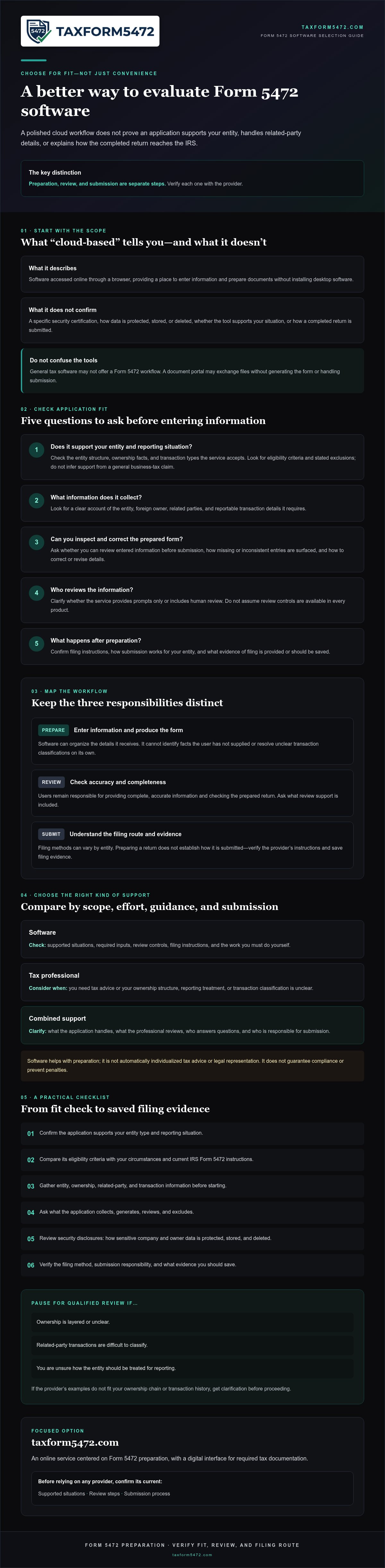
A Practical Checklist for Choosing and Using Form 5472 Software
A clear sequence helps you catch gaps before entering sensitive information or approving a form. Use this checklist to compare the application’s stated scope with your entity and reporting facts, then verify what happens after preparation. A cloud based application for generating irs information return 5472 can organize a workflow, but the information still needs to be complete and checked against your records.
What should you prepare before starting an application?
Gather the records first. This makes it easier to answer intake questions accurately and spot missing information before you reach the review stage.
- 1. Confirm fit. Compare the provider’s supported entity types and reporting situations with your entity structure, ownership, and reporting facts. Check exclusions before creating an account.
- 2. Assemble entity and ownership records. Collect the information relevant to the reporting period, including entity details and records that support the ownership information you’ll enter.
- 3. Organize transaction records. Gather related-party transaction details and supporting documents. If you’re unsure which activity may be reportable, consult the Form 5472 reportable transactions guide.
- 4. Check current IRS instructions. Confirm the applicable form and instruction version, and use them to identify information required for your situation. Don’t rely on an old saved copy without checking that it’s still current.
What should you verify before submission?
Review the generated information against source records, not just against the application’s prompts. Correct errors before approving the form. Confirm the provider’s stated submission process separately; preparation and submission may be distinct steps.
- 5. Reconcile the details. Check names, identification details, reporting period, ownership information, and transaction entries against your records. Resolve blanks or inconsistencies before proceeding.
- 6. Confirm filing instructions. Verify the deadline, filing method, and any required attachments using current IRS guidance for your entity and reporting situation. Don’t assume an application’s default instructions apply to every filer.
- 7. Save the evidence. Retain a copy of the completed form, relevant source records, and any available proof of submission or filing confirmation. Follow applicable recordkeeping requirements and the provider’s document-retention terms.
Ready to review a focused Form 5472 preparation workflow? Review the Form 5472 preparation service, then confirm its supported situations and submission steps against your needs.
Using taxform5472.com for a Focused Form 5472 Workflow
TaxForm5472 provides an online service focused on Form 5472 preparation. Its digital interface is intended to support the handling of required tax documentation. That focus may suit filers seeking a purpose-specific option rather than a general tax platform. Still, don’t infer the exact workflow from the service’s focus alone. Confirm its current scope and steps before entering company or owner information.
The phrase cloud based application for generating irs information return 5472 describes a way to access form preparation online. It doesn’t establish which entity types are supported, whether a human reviews entries, or how a completed return is submitted. Treat those as separate questions. The answers should match your reporting facts and the current IRS instructions that apply to your situation.
What to confirm about the service before you begin
Check the practical details first. Compare the service’s stated eligibility with your entity and reporting circumstances. Then review the information it requests and the steps between entering details and completing preparation.
- Entity fit: Confirm that your entity type, ownership structure, and reporting situation are within the service’s stated scope.
- Information requested: Review what entity, owner, related-party, transaction, and supporting-document details the workflow requires. Gather records before you start.
- Review process: Ask whether you can inspect and correct the prepared information, and whether any human review is included. Don’t assume a review is part of the service unless its terms say so.
- Submission and evidence: Confirm whether the service prepares the form only or also handles submission, which filing method applies, and what confirmation or filing evidence is provided.
These checks help distinguish a focused preparation interface from a broader promise that may not be documented. They also help you identify questions to resolve before providing sensitive details. If an answer is unclear, request clarification rather than relying on an assumption.
How to decide on your next step
Use the application if its stated scope matches your entity and reporting facts, and you understand what you must review and handle yourself. If eligibility, ownership, or transaction treatment remains uncertain, pause and seek advice from a qualified tax professional. Software can organize information, but prompts alone can’t resolve every fact-specific reporting question.
Review the Form 5472 preparation service and confirm its current scope, review steps, and submission process before proceeding. Choose it only if those details fit your needs.
Choose a Workflow That Fits Your Filing Needs
The right application should clearly support your entity and reporting situation, explain what information it needs, and show how review and submission are handled. A cloud based application for generating irs information return 5472 can organize form preparation, but it doesn’t replace your responsibility to check the details or seek professional advice when reporting questions remain.
Compare the provider’s stated scope with your facts before sharing records. Confirm its review steps, data-handling terms, filing method, and what evidence you’ll receive. TaxForm5472 focuses specifically on Form 5472 preparation and provides a digital interface for required tax documentation. Verify that its current workflow fits your needs before proceeding.
Review the Form 5472 preparation service and check the service details against your situation. With the right fit and a careful review, you can move forward with a clearer preparation process.
Frequently Asked Questions
Is a cloud-based application enough to prepare Form 5472?
It can help prepare Form 5472 if it supports your entity and reporting situation. A cloud based application for generating irs information return 5472 may collect details and organize them into a form, but you still need to provide accurate information and review the result. Software prompts don’t resolve unclear ownership or transaction questions. Confirm the provider’s scope, review process, submission method, and whether professional advice is needed for your facts.
Can general tax software generate IRS Form 5472?
Some general tax software may support Form 5472, but don’t assume it does based on business-tax features alone. Check the product’s supported forms and entity types, and confirm it handles your specific reporting situation. A document portal may store or exchange files without generating the form. Ask whether the software prepares Form 5472, supports review and corrections, and explains how the completed return is submitted.
What information should I have before using Form 5472 software?
Gather entity and ownership records for the reporting period, along with related-party transaction details and supporting documents. You may need identifying information for the entity and relevant owners or related parties. Review the current IRS instructions to confirm what applies to your situation, and check which form and instruction version you’re using. Organizing source records first makes it easier to enter details accurately and reconcile the completed form.
How do I know whether an application actually files Form 5472?
Ask the provider to distinguish preparation from submission. Confirm whether the service only generates the form or also sends it to the IRS, which filing method applies to your entity, and whether supporting documents are needed. Find out what confirmation or filing evidence you’ll receive and how to access it. Don’t treat a completed form, a saved copy, or an application status message as proof of submission unless the provider explains what it means.
Is cloud software suitable for a foreign-owned US corporation?
It may be suitable if the application explicitly supports your corporation’s ownership structure and reporting facts. “Foreign-owned” alone doesn’t confirm eligibility for every tool or determine how transactions should be reported. Check supported entity types, exclusions, and required information before starting. If ownership is layered, transaction treatment is uncertain, or you’re unsure whether reporting applies, seek qualified tax advice rather than relying on software prompts.
What happens if I find an error after preparing Form 5472 online?
If you find an error before submission, use the provider’s stated correction process and review the updated form against your source records. If you’ve already submitted it, contact the provider to clarify what was filed and what correction steps may apply. Keep the original form, corrected version, and submission evidence. For advice on how to address a filed error, consult a qualified tax professional and current IRS guidance.
How much does Form 5472 software cost?
Pricing depends on the provider and its service terms. taxform5472.com charges a fee for each Form 5472 prepared and filed through its online platform, but check the website for current pricing and what the fee covers. Confirm whether preparation, review, submission, or other steps are included before you proceed. Don’t assume every provider uses the same pricing model or includes the same services.