
A completed form isn’t automatically a review-ready summary. A web application for generating part iii form 5472 transaction summaries should help organize transaction records, counterparties, categories, and amounts while keeping clear how each figure was classified.
That distinction matters when information is spread across invoices, bank records, and related-party accounts. You need to know what belongs in Part III, how amounts were grouped, and whether the summary can be checked against supporting records. Convenience alone isn’t enough if a workflow makes omissions or misclassification harder to spot.
This article explains how to organize Part III transaction data and what practical features support accurate preparation and review. You’ll see what information to assemble, how to assess an application’s handling of categories and amounts, and how a clear review trail can make manual reconciliation easier. The goal is a usable summary that supports Form 5472 preparation, not a black-box output that leaves you guessing.
Key Takeaways
- Identify the reporting corporation and related-party facts before organizing Part III entries.
- Use a clear sequence to gather records, categorize transactions, review totals, and prepare the form.
- Evaluate a web application for generating part iii form 5472 transaction summaries by its input structure, category mapping, reviewability, data handling, and filing scope.
- Reconcile summary amounts against supporting records to help spot omissions and classification issues.
- Use TaxForm5472's online service to prepare and file Form 5472.
What a Part III Form 5472 Transaction Summary Needs to Show
A transaction summary organizes information used to support reportable transaction entries in Part III of Form 5472. It connects each amount to a transaction type, the related party involved, and the records behind the figure. It’s working material, not a separate IRS form or a substitute for checking the instructions for the applicable tax year.
At a glance
- Form: Form 5472, an information return.
- Reporting party: The reporting corporation identified for the filing.
- Related party: The party involved in a transaction that may be reportable under the applicable rules.
- Transaction data: The type, amount, direction, and supporting records for each item under review.
Reporting depends on the reporting corporation’s circumstances and its relationship with the other party. A foreign person’s involvement alone doesn’t make every payment reportable. Identify the parties and the nature of each transaction before deciding how to handle it. For a general overview of the form’s purpose and filing context, see Form 5472 Wikipedia; use the IRS form and instructions for filing decisions.
Which transactions belong in a Part III summary?
Start with the transaction categories and labels on Form 5472 and the instructions for the relevant tax year. The form groups certain reportable dealings between the reporting corporation and related parties. The correct category depends on what took place, not simply on how a payment appears in a bank statement or ledger.
Separate potentially reportable related-party transactions from routine business activity with unrelated parties. Also look beyond cash payments: the IRS instructions address reportable transactions that may include noncash exchanges, capital contributions, or formation costs paid by an owner. These examples don’t mean every transaction belongs in Part III. Verify the applicable treatment and section against current instructions.
What information makes a transaction entry useful?
Record enough detail to trace and review each amount. A practical working summary can capture:
- Transaction type and a brief description.
- Amount and direction, such as paid, received, lent, or borrowed.
- Related-party identity and the reporting period.
- Source records that explain how the amount was determined.
Keep category-specific details separate until you verify what the current form requires. Reconcile summarized amounts to supporting records, and document how mixed or unclear entries were classified. A web application for generating part iii form 5472 transaction summaries can give this information a consistent structure, while the underlying records and current IRS instructions remain essential to review.
How a Web Application Can Organize Form 5472 Part III Data
An online workflow can turn a collection of records into information that’s easier to review before form preparation. Keep source documents, party details, transaction descriptions, and amounts connected. A web application for generating part iii form 5472 transaction summaries can provide that structure, but the quality of the result still depends on complete source information and careful review.
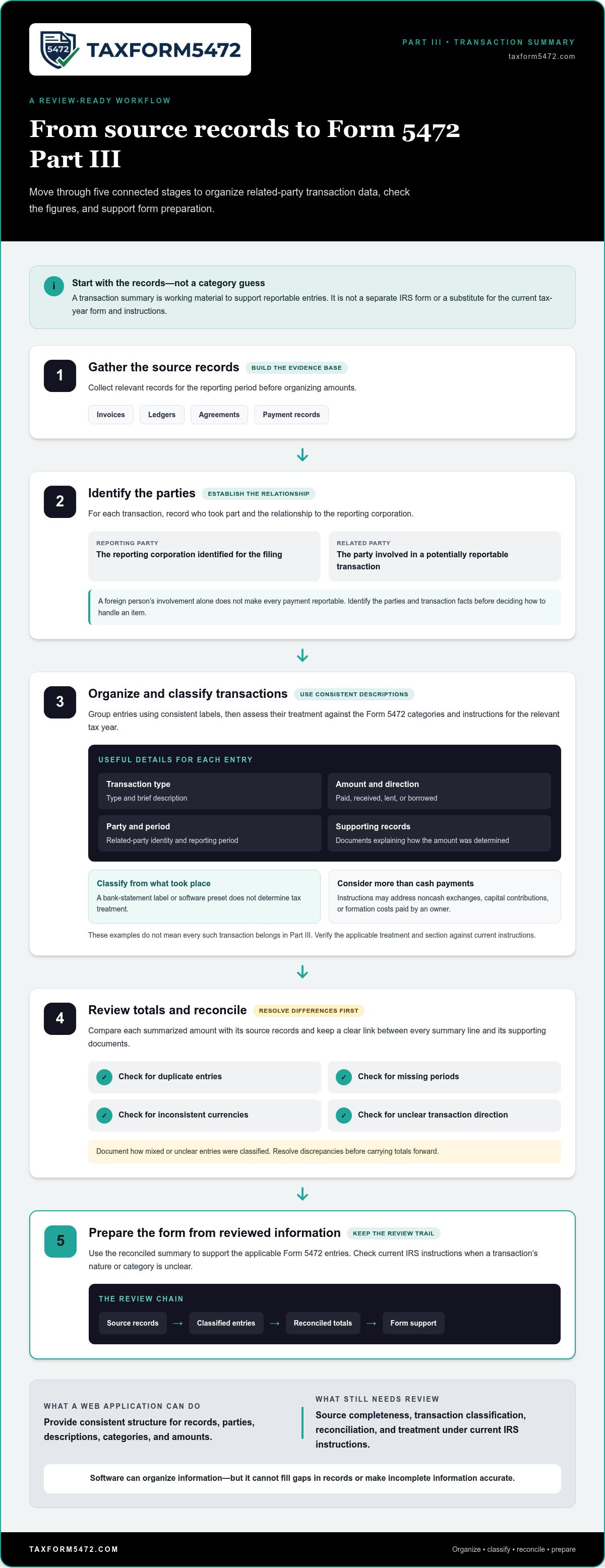
Use this sequence to organize the work:
- Gather records. Collect relevant invoices, ledgers, agreements, and payment records for the reporting period.
- Identify related parties. Record who took part in each transaction and the relationship to the reporting corporation.
- Organize transactions. Group entries using consistent descriptions, then assess their treatment under the current form and instructions.
- Review totals. Reconcile grouped amounts to source records and resolve discrepancies.
- Prepare the form. Use reviewed information to support the applicable Form 5472 entries.
From source records to categorized transaction data
Start with the underlying documents, not a category guess. An invoice might describe a service, while a ledger records the payment and an agreement explains the parties’ arrangement. Consistent labels help connect those records without changing their meaning. For example, use the same party name and transaction description across the working summary and supporting files.
Then compare the facts with the categories and instructions for the relevant tax year. A software field or preset label doesn’t determine tax treatment. The IRS Form 5472 Official Page provides access to the current form and instructions. Use those materials to verify the correct treatment when the transaction’s nature or category is unclear.
Where review and reconciliation fit
Review comes before form preparation. Compare each summarized amount with its source records, then check for duplicate entries, missing periods, inconsistent currencies, and unclear transaction direction. Resolve differences before carrying totals forward. Keep a clear link between each summary line and the documents that support it.
A transaction summary is only as reliable as the source records behind it. Software can organize information and reduce inconsistent descriptions, but it can’t fill gaps in records or make incomplete information accurate. Users remain responsible for providing complete and accurate source information and reviewing the result against current IRS instructions.
For a focused digital route to Form 5472 preparation and filing, submit required tax documentation online.
How to Compare Part III Transaction-Summary Applications
Compare how an application handles transaction information, not how polished its screens look. A clear interface can make data easier to enter, but it doesn’t establish whether a transaction has been classified correctly or whether the summary is complete. Use the current form and IRS Form 5472 Instructions as the reference for required information.
| Review area | What to assess | How to apply the criterion |
|---|---|---|
| Input structure | Can you enter consistent transaction descriptions, amounts, periods, and related-party details? | Organize the source information consistently before submitting documents for Form 5472 preparation. |
| Category mapping | Can you see how source information is associated with the relevant form category? | Compare each classification with the current form and instructions. A field label alone doesn’t establish tax treatment. |
| Reviewability | Can a reviewer trace a figure to its transaction description and supporting records? | Keep enough context with each entry to check amounts, descriptions, and totals. |
| Data handling | How are documents submitted and information handled during preparation? | Review the application’s process and policies so you understand how your documents are handled. |
| Filing scope | Does the service address Form 5472 preparation and the filing task at hand? | TaxForm5472 focuses on Form 5472 preparation and filing for U.S. corporations with foreign ownership. |
Does the workflow make each amount traceable?
A reviewer needs more than a total. They need to understand what the entry represents, which related party it involves, and how the amount connects to supporting records. Look for clear review points that make it possible to spot duplicate amounts, omissions, or descriptions that don’t match the source documents. If a figure can’t be traced, it’s harder to verify.
Does the tool fit the reporting task?
Form 5472 preparation is a specific reporting task. It isn’t the same as general bookkeeping or personal income-tax filing. Compare the application’s purpose with the company’s reporting circumstances, then check the information against the current form and instructions. A web application for generating part iii form 5472 transaction summaries can support organization, but the user still needs to review the facts and classification.
For a broader view of how digital workflows support preparation, read this guide to automated Form 5472 preparation. Use the same standard throughout: clear inputs, traceable amounts, and a review process grounded in the applicable IRS instructions.
A Practical Workflow for Preparing Part III Transaction Summaries
Separate information gathering from classification and review. This makes it easier to use a web application to organize the process while recognizing where judgment is still needed. Use the current Form 5472 and IRS instructions to verify reporting requirements, categories, and line references for the relevant tax year.
Collect and organize records before entering data
- Identify the reporting corporation and period. Assemble the entity details needed for Form 5472 preparation and define the records to review for the reporting period.
- Identify related parties. Record each party’s identity and relationship to the corporation. Verify the relevant facts against the applicable instructions.
- Gather source documents. Collect records such as invoices, accounting ledgers, agreements, and payment documentation. Keep them available so each amount and description can be traced to its source.
- Build a transaction list. Record the date or period, parties, description, amount, and direction of each item being reviewed. Use consistent wording, but don’t assign a form category based only on a bookkeeping label.
Whether a transaction is reportable and where it belongs depend on its facts and the applicable guidance. This guide to reportable transactions under Form 5472 can help frame the review. Confirm each treatment against the current IRS instructions before carrying it into the summary.
Review the summary before form preparation
- Categorize with the current form in view. Match transaction facts to the relevant Part III categories only after checking the applicable form and instructions. Flag uncertain entries rather than forcing them into a category.
- Reconcile amounts. Compare summary totals with the accounting records and supporting documents. Check for missing periods, duplicate entries, unexplained differences, and inconsistent descriptions or currencies.
- Resolve exceptions. Investigate unclear transaction direction, missing amounts, or records that don’t agree. Keep notes on the resolution so the treatment is understandable during review.
- Prepare the form from reviewed data. Verify line references against the current IRS instructions. Then use the reconciled summary to support form preparation.
Automation can help organize submitted information, but it can’t establish facts that aren’t in the records or replace a review of the transaction’s treatment. A web application for generating part iii form 5472 transaction summaries is most useful when it supports a clear path from source documents to reviewed entries. Keep responsibility for complete source information and final review in the workflow.
Use online Form 5472 preparation to submit required tax documentation through a focused digital process.
Prepare Part III Information Through the TaxForm5472 Application
TaxForm5472 provides an online service focused on Form 5472 preparation and filing for U.S. corporations with foreign ownership. Its automated digital platform facilitates submission of the required tax documentation and supports the Form 5472 compliance process. This gives companies a focused route from organized records to preparation and filing.
The application supports Form 5472 preparation, while deciding whether a transaction is reportable and how it should be classified still depends on the facts and current IRS guidance. A web application for generating part iii form 5472 transaction summaries can help support an organized process. Review the prepared information against source records and the current IRS form and instructions before filing.
Who the online Form 5472 workflow is designed to serve
The service is designed for U.S. corporations with foreign ownership that need Form 5472 preparation and filing. It’s relevant if you’re gathering entity details, related-party information, and transaction records for that filing. Its focus is specific: Form 5472, not personal income-tax filing such as Form 1040 or representation in tax court.
Keep the distinction between document submission and tax review clear. A digital interface facilitates submitting required documentation, while accurate reporting still depends on complete facts, appropriate classification, and review against the applicable instructions. Review each Part III item and its supporting records as part of preparing the form.
Move from organized information to the next step
Before starting, bring together the core information needed for preparation:
- Reporting corporation details and information for the relevant reporting period.
- Related-party identities and the relationship to the corporation.
- Transaction records, descriptions, and amounts, with supporting documents available for reference.
Organized records make the transition to preparation more direct. If details remain unclear, flag them for review rather than guessing at a category. Check line references and reporting treatment against current IRS guidance. The platform supports document submission, Form 5472 preparation, and filing; the information supplied still needs to be complete and accurate.
When your Form 5472 information is ready, use the online platform to Start your Form 5472 preparation.
Move Forward with a Clear Form 5472 Workflow
Reliable Part III summaries start with organized records, clear related-party details, and amounts that can be traced back to their sources. An online workflow can make information easier to gather and review, but it doesn’t replace checking transaction classifications against current IRS instructions. Choose a web application for generating part iii form 5472 transaction summaries based on how clearly it supports preparation and review, not on interface design alone.
For U.S. corporations with foreign ownership, taxform5472.com provides a specialized online service focused on Form 5472 preparation and filing. Its digital interface facilitates submission of required tax documentation, giving you a focused next step once entity information, related-party details, and transaction records are organized.
Prepare your records, keep supporting documents accessible, and review the information before it moves into the form. Then use the online service to Start your Form 5472 preparation.
Frequently Asked Questions
What is Part III of Form 5472?
Part III reports specified transactions between a reporting corporation and a related party. The applicable categories and fields depend on the current Form 5472 and its instructions. A transaction summary organizes underlying information, such as transaction descriptions and amounts, before form preparation. It doesn’t determine reportability or classification on its own. Review the corporation’s facts and the current IRS instructions before using the summary to prepare the form.
What transactions should appear in a Form 5472 Part III summary?
Include transactions that are reportable under the applicable Form 5472 rules and instructions. Relevant categories may cover different types of payments, receipts, property transfers, or financing activity. Don’t assume every payment to a foreign person belongs in Part III. Consider the relationship between the parties and the transaction’s specific facts, then use the current IRS instructions to verify whether and how the item should be reported.
Can software generate a Part III Form 5472 transaction summary?
Software can provide a structured way to organize information for Form 5472 preparation. A web application for generating part iii form 5472 transaction summaries can help arrange transaction data, but review the resulting information against source records and current IRS instructions before relying on it for form preparation. TaxForm5472 provides an automated online platform for preparing and filing Form 5472.
What information should I gather before preparing a Part III summary?
Gather records for the reporting period, related-party details, transaction descriptions, and amounts supported by source documents. Relevant records may include invoices, agreements, ledgers, and payment documentation. Keep the corporation’s information and party relationships clear. Use consistent transaction descriptions, then compare summary amounts with underlying records. Consult the current IRS instructions to identify the applicable categories and any transaction-specific details needed for Form 5472 preparation.
Does a transaction summary replace Form 5472?
No. A transaction summary organizes information that may be needed to prepare Part III, but Form 5472 remains the reporting form. The summary can’t determine reportability by itself or replace review of the corporation’s facts, related-party relationship, form fields, and current IRS instructions. Use it as supporting work material, then prepare and review the required Form 5472 information according to the instructions for the relevant tax year.
How can I check whether a Part III transaction summary is accurate?
Reconcile each summarized amount with accounting records and supporting documents. Check that transaction descriptions, periods, related-party details, and categories are consistent. Look for omitted items, duplicate entries, and unexplained amounts. Then compare the prepared information with the current Form 5472 and IRS instructions. If a transaction’s tax classification remains uncertain, seek appropriate professional review rather than relying on a software label or assumption.
Is an online Form 5472 application suitable for every foreign-owned U.S. corporation?
Suitability depends on the corporation’s reporting facts, transaction complexity, and preparation needs. TaxForm5472 is an online service focused on Form 5472 preparation and filing for U.S. corporations with foreign ownership. Organize the reporting information and supporting records, then review the completed information against applicable reporting obligations. Users remain responsible for providing complete information.