
What if the code you’re searching for is also requested on Form 5472? The form asks for the reporting corporation’s principal business activity and activity code. The related Form 1120 may also request business activity information. That distinction matters. A digital tool to assemble principal business activity codes for form 5472 can help narrow your search, but it can’t replace identifying the right form fields or matching the code to the company’s actual work.
It’s reasonable to want a quick way to choose. But a convenient keyword match can miss what the business primarily does, especially when its model spans several activities. Start with the company’s operations, compare them with the current IRS forms and instructions and NAICS descriptions, then verify the most suitable code. Keep a brief record of how the business’s activities support your choice. For a pro forma Form 1120, confirm how it should be completed for the entity and filing circumstances.
This article explains where the code belongs, how to use a repeatable search and verification process, and what to review before filing. Once you’ve identified the code, an online Form 5472 preparation workflow can help prepare the filing package alongside your code research.
Key Takeaways
- Confirm which forms apply to your filing situation and review the activity fields on each applicable form.
- Describe the company’s actual operations and revenue sources to narrow relevant activity descriptions.
- Use a digital tool to assemble principal business activity codes for form 5472 as a research aid, then verify the selection against current IRS instructions.
- Review the activity code separately from Form 5472 transaction reporting. Each requires its own checks.
- After verifying the code, prepare the applicable Form 1120 information and Form 5472 filing package through a focused online workflow.
Where the principal business activity code fits in a Form 5472 filing
First, identify the documents that request the code. Form 5472 asks for the reporting corporation’s principal business activity and activity code. The related Form 1120 may also request business activity information. Form 5472 reports specified transactions between a reporting corporation and related parties. Depending on the entity and filing circumstances, it may be submitted with a corporate Form 1120 or with a pro forma Form 1120. Check the current IRS forms and instructions for the applicable tax year before completing the package.
Does Form 5472 itself ask for a principal business activity code?
Yes. Form 5472 includes fields for the reporting corporation’s principal business activity and activity code. The associated Form 1120 may also request business activity information. The filing setup can vary. For example, a foreign-owned U.S. disregarded entity generally uses a pro forma Form 1120 with Form 5472, while other reporting corporations may file a regular corporate return. Confirm the instructions for your entity and reporting situation.
This distinction helps keep two tasks separate: classifying the business on the applicable forms and reporting related-party information on Form 5472. A digital tool to assemble principal business activity codes for form 5472 can support code research, but it doesn’t replace checking the activity fields on the forms you’re filing.
What does the activity code describe?
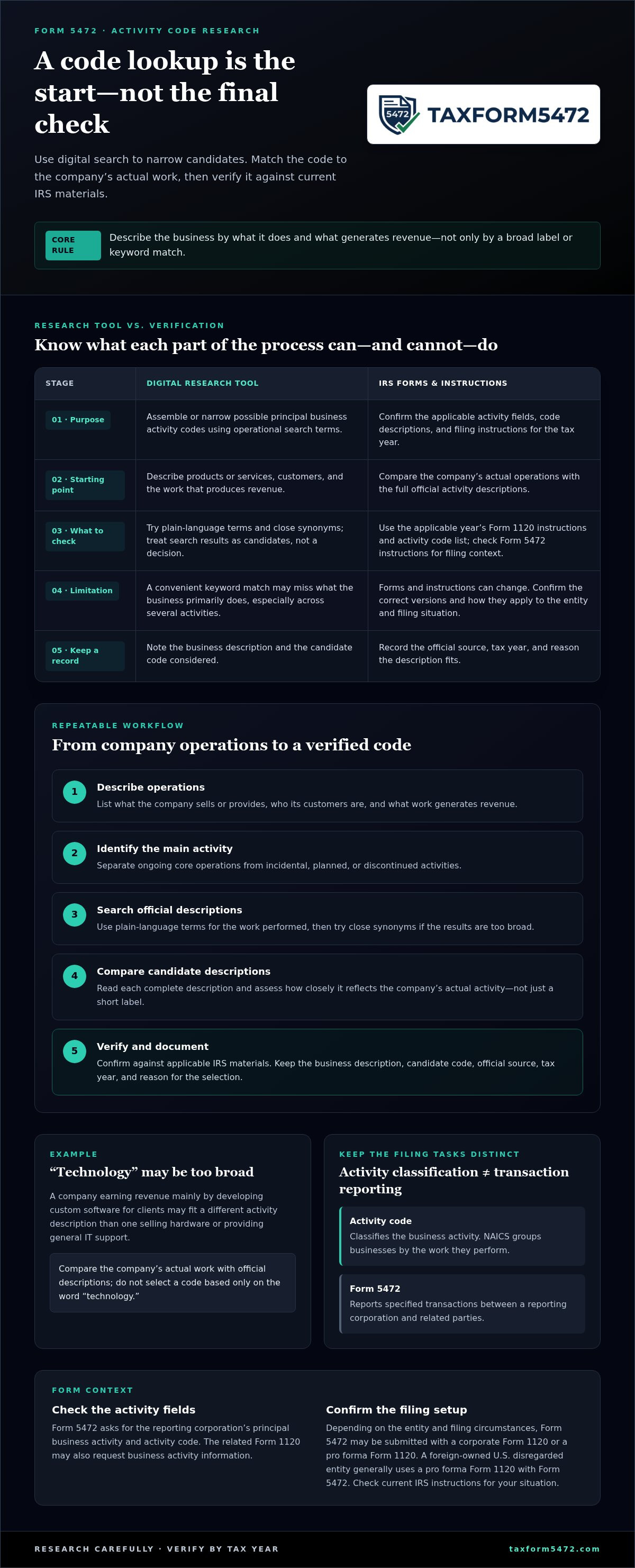
The code classifies the business’s activity. It doesn’t describe the owner’s nationality or where the entity was formed. Principal business activity codes are based on the North American Industry Classification System (NAICS), which groups businesses by the work they perform. Use the applicable IRS forms and instructions to confirm which code and entry apply to your filing.
Start with operations, not just a broad label such as “consulting” or “technology.” Consider what the company actually provides and where its main business activity lies. A company’s website may use broad marketing language that doesn’t identify its primary activity clearly.
Illustrative example, not tax advice: Imagine a company that describes itself as a technology business. It earns revenue mainly by developing custom software for clients, rather than selling hardware or providing general IT support. Those activities may map to different descriptions. The company should compare its actual work with the official activity descriptions instead of selecting a code based only on the word “technology.”
Once you’ve identified the applicable forms, research the code separately from the Form 5472 transaction details. That keeps the classification tied to the business itself and the related-party reporting tied to the information Form 5472 requests.
How to identify a business activity code using a digital research workflow
Use digital search to narrow the options, not to make the decision for you. A reliable process starts with the company’s actual work, then checks possible matches against the IRS descriptions and instructions for the filing year.
- Describe operations. List what the company sells or provides, who its customers are, and what work generates revenue.
- Identify the main activity. Separate ongoing core operations from incidental, planned, or discontinued activities.
- Search official descriptions. Use plain-language terms for the work performed, along with close synonyms.
- Compare candidates. Read each complete description and assess how closely it reflects the business’s actual activity.
- Verify and document. Confirm the code against the applicable IRS materials, then record the source, tax year, and reason for the selection.
How to turn business operations into a search description
Write a short operational summary before opening a code lookup. Include the company’s core products or services, customer types, and the activities that produce revenue. Avoid relying on a broad marketing label such as “technology” or “consulting.” It may describe the brand, but not the specific work performed.
If the company has multiple lines of business, note which one best represents its overall activity. Don’t give equal weight to a service it only plans to launch or an operation it has stopped. The goal is a factual description that can be compared consistently with official classifications.
How to compare candidate codes against IRS descriptions
Search with practical terms such as “custom software development” or “wholesale distribution,” then try related wording if the first results are too broad. A search result is only a starting point. Compare the company’s work with the full activity description, not just a short label or keyword match.
Use the applicable year’s Form 1120 instructions and activity code list as primary references. Check the Instructions for Form 5472 for filing context, and verify how the relevant forms should be completed for your circumstances. Forms and instructions can change, so confirm the correct tax-year versions before filing.
Keep a simple record of the decision: the business description, candidate code considered, official source and tax year, and why the description fits. This makes review more consistent if the company’s operations change or the classification needs to be revisited. A digital tool to assemble principal business activity codes for form 5472 can organize the research, but the final match still depends on accurate facts and IRS guidance.
After verifying the code, proceed to the filing workflow. Prepare Form 5472 online as the next step for the related filing package.
How to compare digital code tools without confusing lookup with tax filing
A code lookup tool and a tax filing service solve different tasks. A lookup tool helps search business classifications. Form 5472 preparation involves completing the required filing information. Don’t assume that a search result, code suggestion, or downloadable list also prepares or submits tax documents.
Compare tools by function, not by how quickly they display a result. The NAICS lookup tools provide access to official classification references. For the code entered on a tax return, confirm the applicable tax-year Form 1120 instructions and IRS guidance as well.
| Capability | What to assess | What it doesn’t establish |
|---|---|---|
| Official source access | Does the tool link to or identify current official references and the applicable tax year? | A search result alone doesn’t confirm the code fits your filing. |
| Search support | Can you search using plain-language descriptions and related terms? | A matching keyword isn’t proof that the classification is correct. |
| Documentation | Can you retain the business description, source, selected code, and rationale? | A saved result doesn’t replace checking the underlying facts. |
| Review | Is there a meaningful review of the company’s operations and candidate descriptions? | Automated output isn’t necessarily a professional assessment. |
| Filing preparation | Does the service prepare Form 5472 or related filing documents? | Code lookup alone doesn’t prepare or submit a tax filing. |
Which capabilities make a code workflow more dependable?
Prefer a research process that points back to official sources, identifies the relevant tax year, and preserves the facts behind the choice. That record should explain what the business does and why the selected description fits. A digital tool to assemble principal business activity codes for form 5472 can organize research, while Form 5472 preparation handles the separate filing task.
When is manual review still necessary?
Review matters when operations span several activities, the business model is unusual, or multiple descriptions appear plausible. Check that the candidate reflects current operations, not an old return or a planned activity that hasn’t become part of the business. Compare the full description with the work performed. Where the circumstances are complex or unclear, software output shouldn’t substitute for qualified tax advice.
Once the code is researched and reviewed, treat Form 5472 preparation as a separate step. An online service focused on preparing and filing Form 5472 supports that filing task.
How to check the code before completing the Form 5472 filing package
Before preparing the filing package, review the activity code and Form 5472 information as separate items. The code describes the business activity reported on Form 5472 and may also be requested on the applicable Form 1120 or pro forma Form 1120. Form 5472 reports specified related-party information. One check doesn’t replace the other.
What information should be checked together?
Use this pre-submission checklist to look for gaps and inconsistencies:
- Business description: Does it match the company’s current products, services, customers, and revenue-generating operations?
- Activity code: Does the full code description reasonably reflect those operations, rather than a broad marketing label?
- Form and filing setup: Do the applicable Form 1120 or pro forma Form 1120 and Form 5472 match the entity’s filing circumstances and current IRS instructions?
- Consistency: Do the business description and code align wherever they appear in the filing package?
- Form 5472 reporting: Have the reportable related-party details been reviewed separately from the business classification?
- Preparation record: Have you saved the code source, tax year, and reason for selecting the code?
Don’t describe a code as legally correct based only on a search result or software suggestion. Its suitability depends on the taxpayer’s actual facts and the instructions for the relevant filing year. A digital tool to assemble principal business activity codes for form 5472 can help organize research, but it doesn’t remove the need to check the business details and filing context.
How can filers handle uncertainty or changing operations?
Revisit the classification if the company materially changes its principal operations. A code used on a prior-year filing may no longer describe the business accurately. Compare current activities with the applicable year’s references, rather than carrying forward an old selection without review.
If two descriptions seem plausible, keep notes on the activities that make the classification uncertain and the IRS materials consulted. Don’t force a decision to complete the checklist. Ask a qualified tax professional to review fact-specific questions when the company’s operations or filing setup make the choice unclear.
After checking the code and the separate Form 5472 reporting details, move to preparation. Prepare and file Form 5472 online through a focused workflow for the filing package.
Complete Form 5472 online after verifying the business activity code
Keep the workflow in order: establish which filing applies, verify the activity code for Form 5472 and any related Form 1120 or pro forma Form 1120, then prepare the required documents. Code research and Form 5472 preparation are connected, but they’re separate tasks. A digital tool to assemble principal business activity codes for form 5472 can support research; review its suggestions against the business’s facts and current IRS guidance.
What to have ready before starting digital Form 5472 preparation
Gather the information needed to prepare the filing package. The details depend on the entity and reporting circumstances, but may include:
- Entity identification and filing information.
- Foreign-owner details relevant to the filing.
- Records of applicable reportable transactions with related parties.
- The business activity description and verified code reference for Form 5472 and related Form 1120 information.
- The correct tax-year documents and instructions for the entity’s filing configuration.
Use current IRS instructions to confirm how the applicable documents should be completed. For example, the requirements for a regular corporate return may differ from those for a pro forma Form 1120. Keep the activity-code support with your preparation records, separate from the records used to report Form 5472 transactions.
Move from code research to Form 5472 preparation
Once the filing context and code are established, shift to the transaction information and other details required for Form 5472. The code identifies the business activity on Form 5472 and may also appear on the applicable Form 1120. Form 5472 reports specified related-party information. Treat each as its own review step, then check that the business description, code, and filing documents remain consistent.
For more filing context, review the guide on IRS Form 5472 filing and automation alongside the current IRS instructions. Use the relevant tax-year documents, and don’t carry forward assumptions from a prior filing without checking whether they still apply.
TaxForm5472 provides an online service focused on preparing and filing Form 5472 for foreign-owned U.S. corporations. Use the service to prepare and file Form 5472 after identifying the applicable filing context and researching the activity code.
Ready to move from research to preparation? Begin online Form 5472 preparation.
Verify the code, then prepare your filing
The activity code is requested on Form 5472 and may also be requested with the applicable Form 1120 information. Start with the company’s actual operations, compare them with current IRS descriptions, and confirm the right tax-year instructions. A digital tool to assemble principal business activity codes for form 5472 can support research, but its suggestions still need review against the business’s facts.
Once the code and filing context are clear, prepare Form 5472 as a separate step. TaxForm5472 provides a focused online service for preparing and filing Form 5472, designed for U.S. corporations with foreign ownership.
Start your online Form 5472 preparation. Move forward with your code research documented and your filing workflow organized.
Frequently Asked Questions
Does Form 5472 have a principal business activity code field?
Yes. Form 5472 includes fields for the reporting corporation’s principal business activity and activity code. The associated Form 1120 may also request business activity information. Check the current-year Form 5472, applicable Form 1120 or pro forma Form 1120, and instructions for your entity and filing configuration. Don’t assume that one form’s entry or instructions automatically settle what belongs in every document in the filing package.
How do I find the right principal business activity code for my company?
Start with a factual description of the company’s products, services, customers, and revenue-generating operations. Search the activity code list and instructions for the applicable IRS form and tax year. Compare the full descriptions with what the business actually does, not just search-result labels. If more than one code seems possible, document the activities considered and why your choice best reflects the company’s principal activity.
Can software automatically choose my business activity code?
Some digital tools can search classifications or organize possible matches, but their output isn’t verified just because software produced it. The right match depends on the company’s actual operations and the applicable form instructions. Check suggestions against current IRS materials. Manual review matters when the business has several activities, its operations are unusual, or the descriptions don’t clearly distinguish between possible classifications.
What if my company has more than one business activity?
Review the company’s activities and determine which best represents its principal business under the applicable IRS guidance. Don’t select a code simply because it matches one product or uses a broad label that seems to cover everything. Keep a short record of the activities considered and the reason for your selection. If the facts make the classification unclear, seek advice from a qualified tax professional.
Is the business activity code the same as a NAICS code?
IRS business activity codes draw on industry classification concepts, including NAICS, but use the code and description requested by the specific tax form. A code used for another business purpose may not be the right entry for a tax filing. Check the current form instructions and official code list for the relevant tax year, then compare the description with the company’s actual operations.
Should I change the code if my company changes what it does?
Reassess the code when the company’s principal operations change materially. Compare its current activities with the IRS descriptions for the applicable tax year, and keep the prior and updated rationale with the preparation records. A revenue fluctuation alone doesn’t necessarily mean the activity has changed. Consider whether the underlying work the company performs is different before revising its classification.
Can a Form 5472 filing platform assemble the activity code for me?
A Form 5472 platform supports preparation and filing, while code research remains a separate step. A digital tool to assemble principal business activity codes for form 5472 may help organize research, but verify the selection against company records and current IRS instructions. TaxForm5472 provides online Form 5472 preparation and filing for U.S. corporations with foreign ownership.