
Can software for reporting capital contributions on form 5472 determine whether an owner transfer is reportable? Software can help organize transaction records and supporting documents, but the reporting treatment depends on the facts and the current IRS instructions. A consistent tracking process makes those facts easier to review.
When contribution details are spread across bank statements, ownership records, and bookkeeping systems, important information can be missed during Form 5472 preparation. This article provides a reusable template for recording the date, amount, contributing party, ownership relationship, transaction description, and supporting documents for each transfer.
You’ll also learn how to review related-party contributions against current IRS instructions, flag transactions that need further tax-rule analysis, and prepare a clear handoff for form preparation. For foreign-owned U.S. disregarded entities, contributions may fall within the broad scope of transactions to review. Recording each transfer is a practical first step, but recordkeeping software does not determine the applicable reporting rules.
Key Takeaways
- Use a reusable tracker to record each contribution’s date, amount, currency, parties, ownership relationship, purpose, and supporting documents.
- Assess possible Form 5472 reporting based on entity classification, related-party status, transaction facts, and current IRS instructions.
- Reconcile contribution entries with bank activity and corporate records, then flag and document unresolved differences.
- Use software for reporting capital contributions on form 5472 as part of a filing workflow, not as a substitute for determining tax treatment.
- Prepare a clear handoff from organized transaction records to Form 5472 preparation and review.
What Software for Reporting Capital Contributions on Form 5472 Should Help You Track
Software for reporting capital contributions on form 5472 organizes transaction records and supporting documents; it does not replace tax-rule analysis. Treat the tracker as a working file for review, not as an automatic decision that a contribution is reportable or excluded.
Keep relevant reporting context alongside each transaction. Entity type and tax classification can affect which Form 5472 rules apply. Ownership details help identify whether a contributor may be a related party. The stated purpose and surrounding facts help explain what took place. The tax year ties the record to the applicable filing period and instructions. For basic background on the form, see Form 5472.
Which capital contribution details belong in a tracking record?
Create one record for each transfer. Capture the transaction date, amount, currency, recipient entity, and contributing party. Add the ownership relationship, stated purpose, and payment method. Record where the source evidence is stored, such as a bank statement, transfer confirmation, ownership document, or corporate record.
Include fields for reviewer notes and potential Form 5472 treatment. Keep the original transaction description alongside any bookkeeping label. If the contributor’s identity or the transfer’s purpose is unclear, note the gap rather than filling it with an assumption.
Why a ledger entry alone may not answer the reporting question
A capital account balance summarizes activity, but may not show who transferred funds, when they arrived, how the parties are related, or what evidence supports the entry. Those transaction-level details help a reviewer assess the facts and trace the record back to its source.
Accounting classification and federal tax reporting are related but separate tasks. A bookkeeping entry labeled “equity” or “owner funding” does not settle the reporting treatment. Flag formation-related transfers and other contributions for review under the current IRS instructions, with the transaction facts and supporting records available.
Entity type matters too. The review for a U.S. corporation may differ from the review for a foreign-owned U.S. disregarded entity. Do not apply one conclusion across different structures or tax years. Use the tracker to surface relevant facts and questions, then review the applicable rules and instructions before reaching a reporting determination.
Build a Form 5472 Capital Contribution Template That Preserves the Right Evidence
Use one row for each contribution, and keep transaction facts separate from review conclusions. That separation lets a preparer verify what happened before assessing how the transfer may be treated for Form 5472 purposes.
The template below is a starting point. Adapt the fields to the entity’s records and use consistent names for entities, dates, currencies, and document references.
| Tax year | Date | Amount | Currency | Contributor | Recipient | Ownership relationship | Description and purpose | Payment method | Source-document reference | Reviewer status | Review notes or open questions |
|---|---|---|---|---|---|---|---|---|---|---|---|
| Year under review | YYYY-MM-DD | Enter amount | ISO code | Contributor’s legal name | Recipient’s legal name | Describe relationship | Record stated purpose | Wire, check, or other | File name or folder path | Needs review | Record issue or preparer note |
Suggested columns for a contribution tracking spreadsheet
Use factual fields for what the records show: date, amount, parties, payment method, and stated purpose. Keep reviewer status, potential Form 5472 treatment, and follow-up questions in separate analysis fields. Mark conclusions as pending until reviewed. Apply the same date format, currency codes, entity names, and document-reference conventions to every entry. A simple status list can include “collected,” “needs review,” and “ready for preparation.”
Documents to associate with each contribution entry
Link each row to evidence that helps trace the transfer. This may include a bank statement, wire or transfer confirmation, ownership records, and relevant corporate documents. Attach agreements or resolutions when they explain the contribution’s purpose or terms. The IRS Instructions for Form 5472 are the official reference for reviewing potential reporting treatment, including formation-related transactions.
Do not rely on a summary field alone. Preserve the underlying source evidence in an organized folder or document system, and make each tracker reference specific enough for another reviewer to locate the file. If a confirmation or supporting record is missing, mark it as missing and add a note. Do not reconstruct uncertain details as if they were documented facts.
Once entries and evidence are organized, a filing-focused workflow can carry that information into Form 5472 preparation. The tracker supports the handoff, but it does not establish tax treatment on its own.
Determine Whether a Capital Contribution May Be Reportable on Form 5472
A contribution’s bookkeeping label is a starting point, not a reporting conclusion. Review the entity’s tax classification, the parties’ relationship, the transaction facts, and the instructions for the relevant tax year. A foreign-owned U.S. disregarded entity has specific Form 5472 considerations: contributions to and distributions from the entity fall within the broad scope of transactions that may require reporting.
An accounting label describes how a transaction was recorded; it does not determine its final Form 5472 treatment. Even the legal definition of a capital contribution cannot settle the federal reporting analysis for a specific transaction. Review the complete facts and current instructions.
Questions to review before assigning Form 5472 treatment
Identify the reporting entity and the other party. Document their ownership relationship, when the transfer occurred, and its stated purpose. Then check the applicable tax-year instructions and entity-specific rules before recording a conclusion. Do not carry forward a prior-year decision without confirming that the ownership structure, transaction facts, and instructions still align.
| Recorded contribution | Relationship to foreign related party | Supporting evidence | Review outcome |
|---|---|---|---|
| Transfer described as initial funding | Contributor’s relationship is documented | Transfer record and formation documents | Review under applicable entity rules and tax-year instructions |
| Transfer labeled owner contribution | Relationship is unclear | Bank record available; ownership documents incomplete | Hold for follow-up; do not assume treatment |
| Transfer recorded as equity | Contributor is identified | Corporate records and payment evidence located | Reviewer assesses transaction facts and applicable instructions |
These examples illustrate review steps, not automatic reporting outcomes. Formation-related transactions may need particular attention, but their treatment depends on the facts and applicable instructions. Record what is known, cite the evidence, and leave a reasoned review note rather than treating a label as proof.
When a contribution entry needs further tax review
Flag vague descriptions, transfers that combine several purposes, and incomplete ownership records. A flag means the entry needs more analysis or evidence. It does not, by itself, mean the transaction is reportable. For more review questions and transaction categories, see this guide to reportable transactions under Form 5472.
Use software for reporting capital contributions on form 5472 to keep transaction facts, documents, and review notes connected. Keep the conclusion separate from the original record so a preparer can distinguish documented information from items that still need analysis.
Use the Tracker to Reconcile Contributions Before Form 5472 Preparation
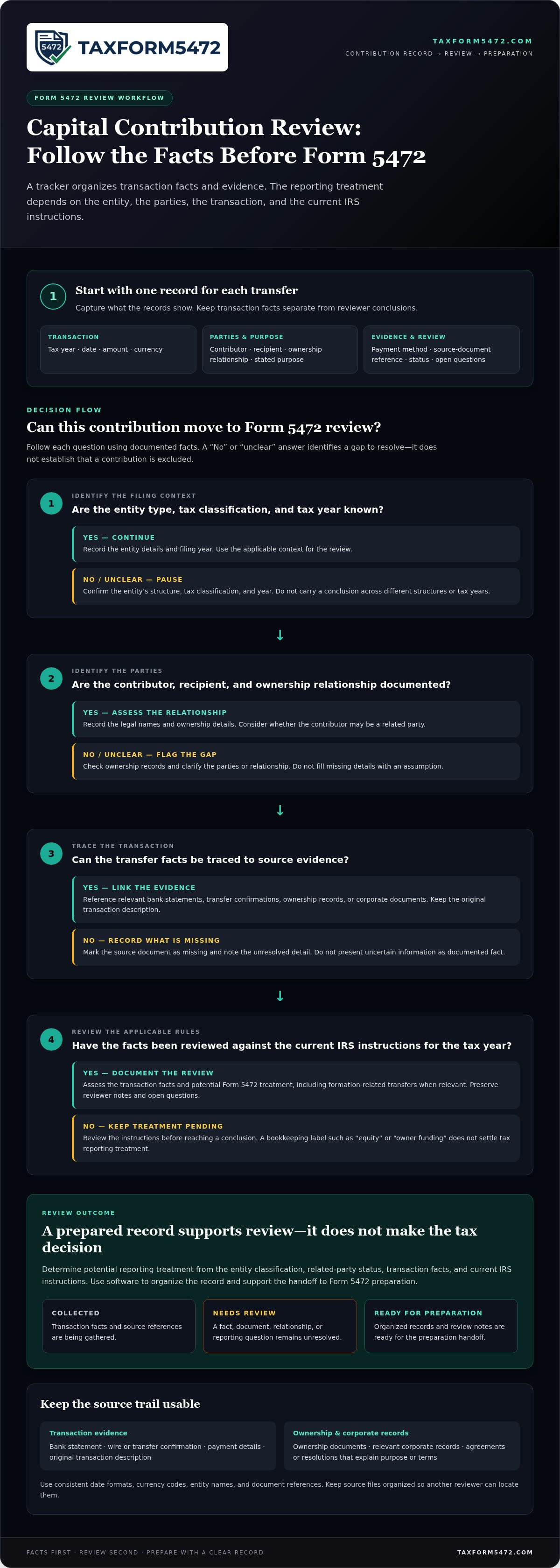
A tracker is useful only when its entries match the underlying records. Reconcile each contribution before handoff. Consistent entity names, tax years, currencies, and descriptions make gaps easier to spot and give the preparer a clearer record to review.
A practical review sequence for contribution records
- Collect and enter. Gather available bank activity, transfer confirmations, and corporate records. Add each contribution as a separate entry and reference its supporting documents.
- Match the records. Compare each tracker entry with the relevant bank activity and corporate documentation. Check that the date, amount, currency, contributing party, and recipient agree. Use consistent descriptions across records where possible, while preserving the original wording in source documents.
- Investigate differences. Record unmatched amounts, unclear dates, missing evidence, or inconsistent descriptions. Do not force a reconciliation by changing a source record or assuming why figures differ. Note what remains unresolved and what follow-up is needed.
- Route uncertain items for review. Keep unclear classifications or transaction purposes marked for review. Separate confirmed facts from assumptions. Obtain reviewer sign-off before using unresolved items to support preparation conclusions.
How to prepare a clean handoff for filing software
Group the final log by reporting entity and tax year. Use a consistent naming pattern for documents, such as entity name, transaction date, and document type. Keep currency notation and entity names consistent across the tracker and source records. These controls make it easier for a preparer to trace an entry back to its evidence.
Include the reconciled tracker, document references, reviewer notes, and a short list of open questions. Mark each item as a verified fact, an assumption needing confirmation, or an unanswered tax question. A reviewer should be able to see the transaction trail and what remains unresolved without mistaking a bookkeeping description for a tax conclusion.
This handoff connects recordkeeping to a filing-focused preparation process. Review the Form 5472 filing and automation guide for broader filing context. For a structured next step, use online Form 5472 preparation after organizing the transaction records and review notes.
Choose Form 5472 Software That Connects Contribution Records to Filing Preparation
A spreadsheet and filing-focused software address different parts of the process. A spreadsheet provides a flexible place to log contribution facts, link evidence, and record review notes. It also depends on consistent manual updates, and the preparer may need to gather information from several files before starting the return.
Form 5472-focused software is built around preparing the form and can provide a more direct transition from organized transaction information to filing preparation. Evaluate how clearly the process keeps source facts, supporting documents, and unresolved items available for review. Neither a spreadsheet nor software independently establishes the legal or tax treatment of a contribution.
What to evaluate in a Form 5472-focused workflow
Assess whether the workflow is designed for Form 5472 preparation rather than general bookkeeping. Consider how the information you’ve gathered is used in preparation and whether missing details or open questions remain visible. A useful process supports review of transaction facts against source records instead of turning a bookkeeping category into an automatic reporting conclusion.
With a spreadsheet-only process, consistency depends on how the log and documents are maintained. Filing-focused software centers the next step on Form 5472 preparation, while a separate tracker can retain transaction-level details and evidence. In either process, keep reviewer notes and unanswered questions distinct from confirmed facts.
Move from organized records to online Form 5472 preparation
Before beginning preparation, group the contribution log and supporting documents by entity and tax year. Reconcile entries to available records, identify missing evidence, and summarize questions that still need review. This gives the preparation process a clear starting point. For broader workflow context, see this guide to automated Form 5472 preparation.
TaxForm5472 provides an online service focused on preparing and filing Form 5472, with a digital interface for preparing and submitting required tax documentation. It is a filing-focused option, not a general accounting system or standalone capital-account ledger. Your organized records support preparation, while the applicable rules and transaction facts guide reporting decisions.
Once your records are assembled and review questions are identified, prepare Form 5472 online.
Turn Contribution Records Into a Clear Filing Workflow
A reliable process starts with a complete, transaction-level record. Log each contribution with its date, amount, parties, ownership relationship, purpose, and supporting evidence. Reconcile entries against bank activity and corporate records, then document gaps or questions for review.
A tracker organizes facts; it does not determine Form 5472 treatment. Entity classification, related-party relationships, transaction details, and the applicable instructions all matter. Use software for reporting capital contributions on form 5472 to support an organized preparation workflow, not to replace review of the rules.
Once your records are assembled, move them into a filing-focused process. TaxForm5472 provides an online platform for preparing and filing Form 5472, with a digital interface for submitting required tax documentation to the IRS. Prepare Form 5472 online and take the next step with organized records and a clear view of items that need attention.
Frequently Asked Questions
Does every capital contribution have to be reported on Form 5472?
Not necessarily. The answer depends on the reporting entity, the relationship between the parties, the transaction facts, and the instructions for the relevant tax year. A bookkeeping label such as “equity” or “owner funding” does not settle the reporting question. Record the parties, date, purpose, amount, and supporting evidence for each transfer. Then review those facts against the current IRS instructions before reaching a conclusion.
Can software determine whether a capital contribution is reportable on Form 5472?
Software can organize transaction facts, flag missing information, and support preparation, but it does not replace applying the relevant tax rules. Software for reporting capital contributions on form 5472 can keep the purpose, parties, timing, and evidence accessible for review. The reporting conclusion still depends on the entity and transaction. If facts are unclear, compare them with current IRS instructions before finalizing treatment.
What information should a Form 5472 capital contribution tracker include?
Record the transaction date, amount, currency, contributor, recipient entity, ownership relationship, description, and source-document reference. Include the tax year, review status, and notes for unresolved questions. Keep factual fields separate from reporting analysis so reviewers can distinguish documented information from assumptions. This structure also helps you reconcile entries with bank activity and corporate records before Form 5472 preparation.
Are capital contributions between related parties reportable on Form 5472?
A related-party relationship can make a contribution relevant to Form 5472 review, but it does not determine the outcome by itself. The entity’s classification and the transaction facts also matter. Record who transferred what, when the transfer occurred, and its stated purpose. Then compare those details with the current IRS instructions for the applicable entity and tax year before deciding how to treat the transaction.
How do I track capital contributions for a foreign-owned U.S. disregarded entity?
Use a transaction-by-transaction log that identifies the entity, contributor, date, amount, currency, stated purpose, and supporting evidence. Keep ownership and formation records organized with the log. Foreign-owned U.S. disregarded entities have specific Form 5472 reporting considerations, including transactions that may involve contributions or distributions. Review the current instructions for the relevant tax year; ordinary ledger treatment alone may not capture the information needed for filing review.
Can a spreadsheet be used to track contributions before Form 5472 filing?
Yes. A spreadsheet can organize transaction facts, source-document references, and review status. Use consistent fields, preserve the underlying evidence, and keep analysis separate from recorded facts. A spreadsheet does not decide whether a transaction is reportable or prepare a complete filing by itself. Use it as an input to Form 5472 preparation, and review uncertain classifications against current IRS guidance before finalizing them.
What happens if contribution records do not match bank or corporate records?
Do not silently change or omit an entry. Identify the difference, retain the underlying records, and document what remains unresolved. First compare dates, amounts, currencies, entity names, and transaction descriptions. Check whether records refer to different stages of the same transfer or use different descriptions. If the difference affects Form 5472 analysis, resolve it before preparation where possible, or flag it clearly for review.