
What if software prepares a clean Form 5472 but misses a transaction or an entity-specific filing detail? Choosing software for reporting foreign affiliate transactions on form 5472 based on automation alone can leave important review questions unanswered.
That uncertainty is reasonable. Related-party activity can include payments for services, loans, interest, property transfers, and capital contributions. There is no minimum dollar threshold for a reportable transaction, so even modest activity may need attention. A sound workflow should help you organize transaction data and identify gaps or exceptions for review.
This article provides a practical framework for comparing software capabilities with accountant-led preparation. You’ll learn what transaction information to gather, which entity and filing details to verify, and how to assess review steps before filing. It also covers what to confirm about supported entity types, transaction categories, and submission methods, so you can choose an approach that fits your filing needs without relying on automation claims alone.
Key Takeaways
- Use software for reporting foreign affiliate transactions on form 5472 to organize preparation, not to resolve uncertain tax treatment.
- Compare how tools handle missing information, inconsistent entries, and records that need human review.
- Weigh software against CPA-led preparation based on the tax judgment, review, and user responsibility your situation requires.
- Test a potential workflow with representative records, then check the prepared form and confirm the submission method.
- A focused online Form 5472 preparation service may suit your needs. Verify its supported entities, transaction types, and review steps before proceeding.
What software for reporting foreign affiliate transactions on Form 5472 must handle
Software for reporting foreign affiliate transactions on Form 5472 can help organize information, prepare the form, and manage the filing workflow. It should provide a structured way to enter reporting corporation details, related-party information, and transaction records, then make those entries available for review. It does not, by itself, determine how tax rules apply to unclear facts.
Form 5472 concerns reportable transactions between a reporting corporation and a related party. “Foreign affiliate” is often used informally to mean a foreign related entity, but the phrase is not a substitute for checking the form’s definitions and filing rules. For general context, see this Form 5472 overview. Use the current IRS Instructions for Form 5472 to confirm the requirements for the relevant tax year and entity.
What does Form 5472 software actually help report?
A useful workflow helps collect and organize information such as the reporting entity’s classification, the related party’s identity and relationship, and transaction records. Those records may include dates, amounts, descriptions, and supporting documents. Software can help map what you enter to form fields and identify unanswered questions. Whether an item is reportable, and how it should be characterized, may require applying tax rules to the facts.
Keep data collection and form completion separate from tax-law analysis. Check the current IRS instructions, and seek qualified tax advice when the reporting obligation or treatment is uncertain.
Does a foreign branch automatically mean Form 5472 applies?
No. A branch is generally an operation of the same legal entity, while an affiliate commonly refers to a separate entity with a relationship to the reporting corporation. Those labels alone do not establish whether a party is related for Form 5472 purposes or whether a transaction must be reported. Ownership, entity classification, and the transaction facts all matter.
For example, a business operating in another country through a branch should not assume the branch is a separate foreign affiliate. It should not assume that the branch structure settles the filing question, either. Confirm how the entity is classified and assess the parties and transactions under current IRS instructions. If the facts are unclear, qualified tax review can help clarify the analysis before you prepare the form.
Before choosing software, confirm that its workflow fits your entity and reporting context. Check what information it asks you to provide and whether you can identify entries that need further review. A completed form is only as reliable as the classification, transaction records, and review behind it.
Which Form 5472 software capabilities support a dependable reporting workflow?
Look for a workflow that captures the information needed to prepare the form and lets you check how that information was used. Software for reporting foreign affiliate transactions on form 5472 should support structured intake for the reporting corporation, related parties, and transaction records. It should also give you a chance to review the prepared information before filing.
Do not assume every platform supports your entity type, transaction categories, or preferred submission method. Ask the provider directly. The IRS Form 5472 page links to official form materials and instructions, which you can use to compare the platform’s output with current IRS guidance.
How should software collect and organize transaction data?
Clear fields make review easier. Check whether the intake separates reporting corporation details, related-party information, and individual transaction records, and whether it maps that information to relevant form sections. For each amount or description, you should be able to identify a source record, such as an invoice, agreement, or account entry.
Transaction labels can help organize entries, but they should not replace tax analysis. Check whether the tool records the information you provide without presenting an uncertain classification as a settled legal conclusion. Flag any transaction whose treatment is unclear for further review.
What review and filing controls should buyers verify?
Test how the platform responds to missing or conflicting information. If you enter a transaction amount but leave its description blank, does the system identify the gap? If answers conflict, can you see what needs correction or human review? Ask who reviews the completed form and what responsibility remains with you as the filer.
Before choosing a platform, verify these practical points:
- Can you inspect and correct the prepared form before filing?
- Which entity types and transaction categories does the provider currently support?
- What submission method applies to your filing, and does the provider handle submission or give you instructions?
- How can you access and retain the completed form and supporting records?
Keep copies of the final form, source records, and filing evidence somewhere you can access later. Confirm the provider’s current process rather than relying on a general software description. For a focused online option, review Form 5472 preparation and check that its supported workflow fits your filing context.
Form 5472 software vs. a CPA: compare the right fit for your situation
Software can organize information and support form preparation. A CPA can apply tax judgment to the facts and review how they affect the filing. Neither approach is automatically right for every filer. Compare the workflow, complexity of your situation, and level of review available before deciding.
| Factor | Focused software | CPA-led preparation |
|---|---|---|
| Workflow | Guided data entry and form preparation, depending on platform capabilities. | You provide information to a professional who prepares or guides the filing. |
| Tax judgment | Organizes answers but may not resolve uncertain tax treatment. | Can assess facts and apply tax judgment within the engagement’s scope. |
| Review | Review steps vary. Confirm who checks the completed form. | Review depends on the service arrangement and agreed scope. |
| Documentation | Check how you can access the output and retain supporting records. | Confirm what records the preparer needs and what you should retain. |
| User responsibility | You may need to classify facts, provide complete data, review output, and follow filing instructions. | You remain responsible for providing accurate information and understanding the filing arrangement. |
Use the Official Instructions for Form 5472 to check requirements, definitions, and form guidance. Software for reporting foreign affiliate transactions on form 5472 can streamline preparation, but it will not automatically resolve an unclear classification or transaction treatment.
When may focused Form 5472 software be a practical fit?
A focused tool may fit when ownership is understood, records are organized, and you can explain the transactions being reported. First confirm that the platform supports your entity type and filing circumstances. Preparation assistance helps organize and complete form information, but it is not necessarily individualized tax advice. Review the provider’s scope and process before relying on it.
When should a tax professional review the filing?
Seek qualified review if entity classification, related-party status, or transaction treatment is uncertain. Unusual ownership, nonmonetary dealings, restructurings, multiple related parties, and incomplete historical records are practical reasons to pause. These situations can require analysis beyond entering information into a form.
For a deeper comparison, see the published article Form 5472 CPA vs. Software: Evaluating Compliance Risks and Costs. Choose based on the complexity of your facts and the support you need, not on the assumption that software or CPA-led preparation is always safer.
How to evaluate Form 5472 transaction-reporting software before choosing
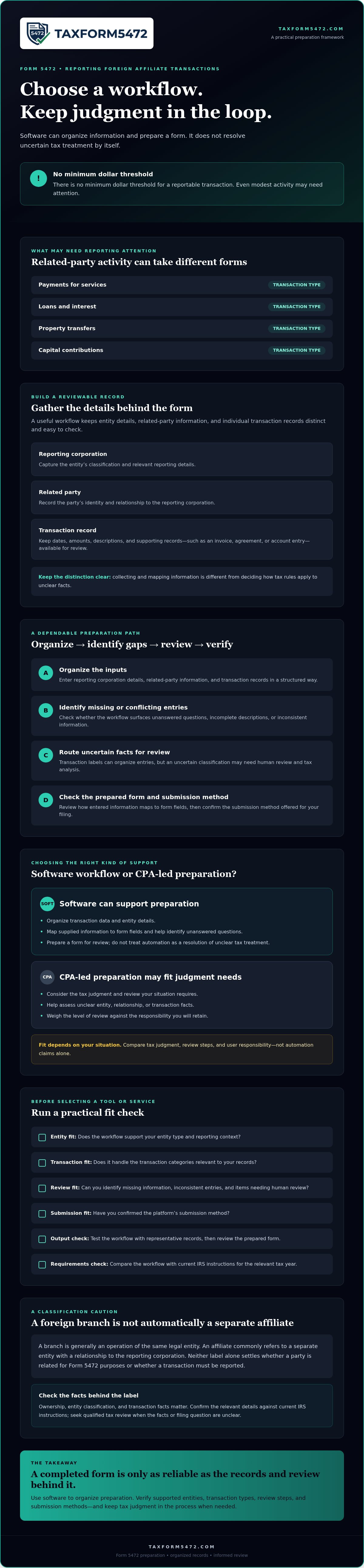
Evaluate the full workflow, not just the form preview. Software for reporting foreign affiliate transactions on form 5472 should fit your filing context, make transaction information traceable, and give you a clear path to review and submission. Use this sequence before choosing:
- Confirm filing context. Check that the platform supports your entity type, filing scenario, and relevant transaction categories.
- Map the data. Identify the details and source records you will need to provide.
- Test exceptions. See what happens when a field is blank, answers conflict, or an entry needs review.
- Review the output. Confirm you can inspect and correct prepared information before filing.
- Verify submission. Ask how the completed documents are submitted and what evidence you should retain.
Try a sample workflow with representative records. Avoid entering sensitive information unless you have confirmed the provider’s data-handling practices and need real records to evaluate the process.
What questions should you ask a software provider?
Get clear answers about scope and process. Ask which entities and filing scenarios the platform currently supports. Find out how users review and correct transaction information, access completed documents, and retrieve records later. Confirm what support covers, who reviews the form, and which tax questions require independent professional advice.
Also ask how the provider handles changes after submission. Find out whether corrections are supported, what steps you must complete, and whether the provider retains documents or expects you to keep your own copies. Do not assume these details from a product description.
How can you check software against the actual filing requirements?
Compare the workflow with the current IRS form and instructions for the tax year you are filing. Trace a representative transaction from its source document through data entry and review to the final form output. Check that the description and amount remain consistent, and note any step where the software asks you to make a judgment it cannot verify.
For further context, see Reportable Transactions Form 5472: A 2026 Compliance Guide and IRS Form 5472 Filing: 2026 Compliance and Automation Guide. Confirm that any referenced guidance matches current IRS materials before relying on it.
If a focused online workflow fits your filing needs, review Form 5472 preparation options. Check the platform’s current supported filing circumstances and submission process before proceeding.
Prepare and submit Form 5472 with a focused online workflow
A focused online workflow can help organize Form 5472 preparation, but it still depends on accurate source information and a final review. Before using software for reporting foreign affiliate transactions on form 5472, confirm that the provider supports your filing situation and understand what happens after preparation. Do not assume that a completed form means the provider submits it or that the workflow resolves uncertain tax questions.
What should users prepare before starting?
Gather records that will help you answer intake questions and check the resulting form. Start with the filing year, entity details, ownership information, related-party records, and documents supporting transaction amounts and descriptions. Review the current IRS instructions for that year before entering data. If you cannot determine an entity classification, relationship, or transaction treatment from your records, note the question and seek qualified tax advice rather than guessing.
How does TaxForm5472 fit into the decision?
TaxForm5472 provides an online service focused on preparing Form 5472 for foreign-owned U.S. corporations. Its digital interface is intended to support preparation and submission of required tax documentation. The exact workflow and scope matter, so check supported cases, transaction categories, review steps, service limitations, and submission instructions directly with the provider before proceeding.
If the service fits your circumstances, a general preparation workflow is straightforward:
- Provide the information. Enter the entity, ownership, related-party, and transaction details requested. Use source documents to support your entries.
- Review the prepared information. Compare the output with your records. Resolve missing or inconsistent details before moving to the next step.
- Follow the filing instructions. Confirm who is responsible for submission, which method applies to your case, and what evidence and supporting records to retain.
Preparation software can organize data and form completion. It cannot guarantee eligibility, error-free filing, penalty avoidance, or a particular submission method. Those outcomes depend on your facts, the provider’s confirmed scope, and the filing instructions that apply to your entity.
Before you begin, verify that your entity and filing circumstances are supported, review the service’s process and limitations, and resolve tax questions that require professional judgment. If the fit is clear, review the Form 5472 preparation service and its current instructions before starting.
Choose a Form 5472 workflow that fits
The right software for reporting foreign affiliate transactions on form 5472 should help organize information and prepare the form while making review and filing responsibilities clear. Compare its supported entity types, transaction categories, review process, and submission instructions with your filing needs. If ownership, classification, or transaction treatment is uncertain, resolve those questions before relying on a prepared form.
For an online option focused on Form 5472 preparation, TaxForm5472 provides a digital interface for preparing required tax documentation. Check the platform’s current scope, review steps, and filing instructions before you begin. Make sure the workflow fits your circumstances and that you understand what remains your responsibility.
Review the Form 5472 preparation platform and confirm it aligns with your filing needs. With the right records, careful review, and a suitable preparation process, you can move forward with a clearer filing workflow.
Frequently Asked Questions
Is software enough to report foreign affiliate transactions on Form 5472?
Software may be enough to organize information and prepare a form when your filing context is clear, your records are complete, and the platform supports your entity and transactions. It does not automatically determine whether a transaction is reportable or resolve uncertain tax treatment. Review the completed information against current IRS instructions. If ownership, entity classification, or transaction treatment is unclear, seek qualified tax advice before filing.
Can software determine whether a transaction with a foreign affiliate is reportable?
Not reliably without accurate facts and the applicable tax analysis. Software can collect details, categorize entries, and flag missing answers, but those functions do not establish that a party is related or that a transaction is reportable. Check the current IRS Instructions for Form 5472 and consider the transaction’s substance, parties, and entity classification. Ask a qualified tax professional to review facts the software cannot resolve.
What information should I prepare before using Form 5472 software?
Gather the reporting entity’s details, ownership information, related-party identities and relationship records, and documents supporting each transaction’s amount and description. Examples include invoices, agreements, loan records, and accounting entries. Confirm the filing year and read the current IRS instructions before entering information. Keep a list of missing documents or unresolved tax questions. Do not guess at a classification or transaction treatment just to complete a software field.
Does a foreign branch have to file Form 5472?
A foreign branch is not automatically a separate foreign affiliate or a Form 5472 filer. A branch is generally an operation of the same legal entity, but the filing analysis depends on the entity’s classification, related-party relationships, and transaction facts. A foreign corporation engaged in a U.S. trade or business may have a reporting obligation if other requirements apply. Check current IRS instructions and seek qualified review if the structure is unclear.
How do I compare Form 5472 software with a CPA?
Compare the preparation workflow, tax judgment, review scope, documentation process, and your responsibilities. Software can organize records and prepare form information; a CPA may provide tax analysis and review depending on the engagement. Ask who checks the completed form, how corrections work, and what you must do before submission. Software may fit organized, understood facts, while uncertain classification or unusual transactions can warrant professional review.
Can Form 5472 software file the form electronically?
It depends on the filing entity, applicable IRS procedures, and the provider’s current submission process. Do not assume that preparing a form online means it can be e-filed. Foreign-owned U.S. disregarded entities must submit a pro forma Form 1120 with Form 5472 attached by mail or fax, not electronically. Confirm the method for your specific filing with the provider and current IRS instructions, then retain filing evidence.
What should I do if the software does not support my transaction or entity type?
Pause before submitting. Do not force an unsupported transaction into a category that may not fit, or omit it to complete the workflow. Ask the provider whether the entity or transaction is supported and how the limitation affects preparation. Review the current IRS instructions and consult a qualified tax professional if treatment remains uncertain. Choose a preparation process that accommodates your filing circumstances and lets you review the resulting documents.