
If you’re asking, “how can i automate form 5472 filing for my foreign-owned us corporation?”, begin by separating repeatable preparation tasks from decisions that need review. Form 5472 reports certain transactions with foreign related parties, so missing or misclassified information can affect the filing.
Automation can help organize records and move information into a filing workflow. It doesn’t replace review of which transactions are reportable, whether the filing reflects the corporation’s circumstances, or whether the information is complete. Give those questions attention before submission.
This guide explains what to gather, which steps can be organized through a repeatable digital process, and where to pause for review. For an online route focused on this form, taxform5472.com provides Form 5472 preparation and filing for foreign-owned U.S. corporations.
Key Takeaways
- Use a consistent process to collect and organize records, but review eligibility and reporting decisions carefully.
- Confirm entity details, gather source documents, enter information, review the draft, and complete the applicable submission process.
- Separate source-document collection, data entry, and final review into distinct steps.
- When comparing manual and software-assisted preparation, consider how each handles information, review responsibilities, and submission.
- Organize records throughout the year and save filing documents so the next preparation cycle is easier to manage.
Why automate Form 5472 filing for a foreign-owned U.S. corporation?
Form 5472 preparation often draws on information in accounting records, bank statements, invoices, and owner-maintained spreadsheets. A structured workflow gives those records a consistent path into the preparation process. Automation can help collect and organize information, but it doesn’t make every reporting decision for you.
Form 5472 is an information return that reports certain transactions with foreign related parties. It doesn’t calculate the corporation’s income tax. A general income-tax workflow may focus on revenue, deductions, and tax calculations, while Form 5472 preparation also requires attention to the corporation’s relationships and transactions. For a general overview of the form’s purpose and filing context, see the Wikipedia article on Form 5472.
Software can streamline repetitive tasks such as collecting records, organizing fields, and preparing information for review. A repeatable process reduces manual copying between documents and forms. It doesn’t guarantee that every transaction has been identified or reported correctly.
What parts of Form 5472 preparation are suitable for automation?
Start with tasks that follow a clear pattern. Guided data entry can prompt you for requested information and organize corporation details and transaction data in the appropriate fields. Depending on the tool, completeness checks may also flag blank fields or information that needs attention.
Consistent record handling helps, too. For example, keep transaction records in a folder organized by reporting period, use clear file names, and follow the same preparation sequence each cycle. When records are complete and clearly labeled, it’s easier to trace an entry back to its source. An organized workflow can make that process more efficient, but it can’t verify the accuracy of the source records.
What still needs informed review?
Review transactions before treating them as reportable or assigning them to a particular category. Questions about whether a transaction falls within reporting requirements, how it should be classified, or what an unusual transaction represents may require context beyond what a form field captures. Payments made on the corporation’s behalf, transfers between an owner and the corporation, and transactions with unclear descriptions are examples that may need closer attention.
To answer “how can i automate form 5472 filing for my foreign-owned us corporation?”, use automation for repeatable steps, then review decisions that depend on facts and context. The process relies on accurate, complete source information. If a transaction is missing from the records or labeled incorrectly, a digital workflow may carry that gap forward.
Automation supports compliance work. It doesn’t independently establish whether a corporation must file, resolve every tax question, or replace tax judgment. A reliable process combines organized records and structured entry with a deliberate review of the corporation’s circumstances, transaction details, and completed form.
How an automated Form 5472 workflow handles corporation filing information
A useful workflow separates record gathering, data entry, review, and submission. Software can organize information and guide entry, while people confirm the facts, resolve unclear transactions, and make sure the filing reflects the corporation’s circumstances.
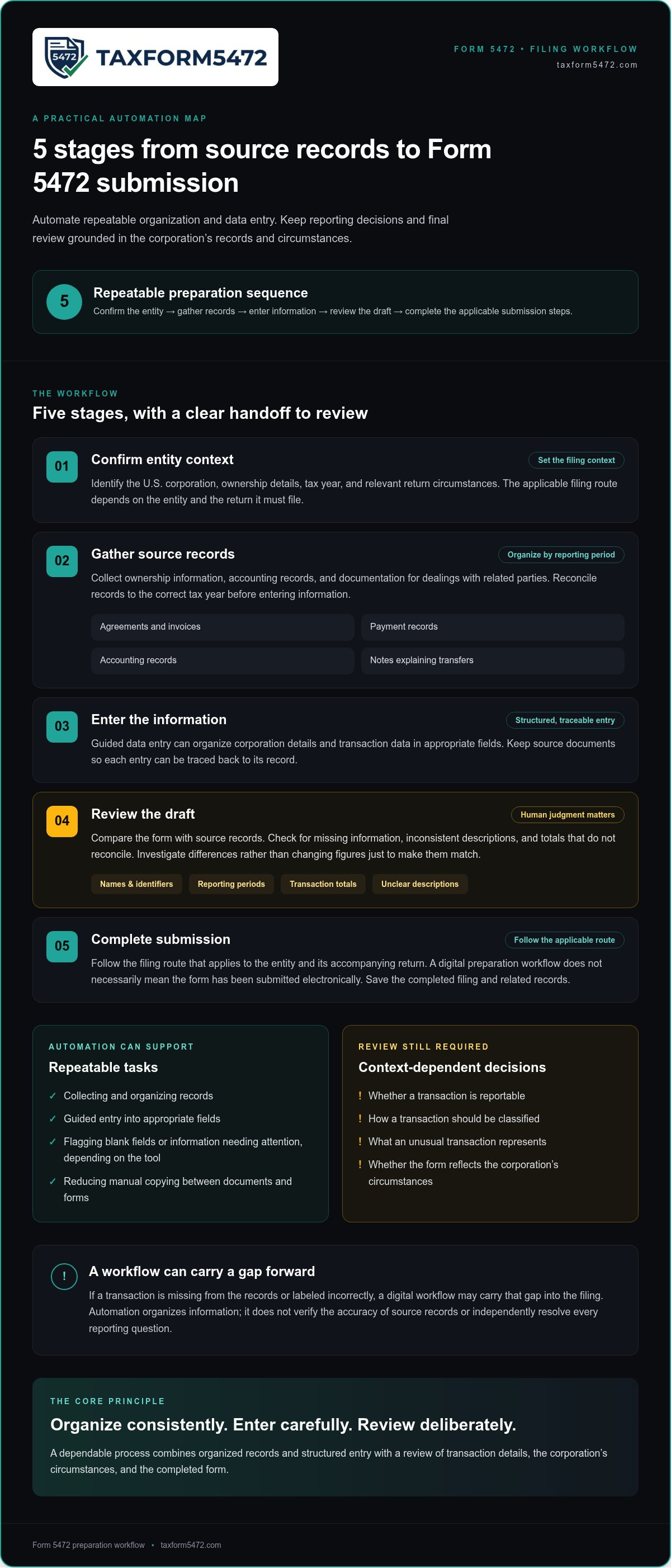
The process moves from confirming the entity to gathering records, entering information, reviewing the draft, and completing the applicable submission steps.
- Confirm the entity context. Identify the U.S. corporation, ownership details, tax year, and relevant return circumstances. The applicable filing route depends on the entity and the return it must file.
- Gather source records. Collect ownership information, accounting records, and documentation for dealings with related parties. Organize the records by reporting period.
- Enter the information. Use guided data entry, where available, to place details in the appropriate fields. Keep source documents so entries can be traced back to them.
- Review the draft. Compare the form with source records. Look for missing information, inconsistent descriptions, and totals that do not reconcile.
- Complete submission. Follow the filing route that applies to the entity and its accompanying return. Save the completed filing and related records.
Prepare source records before using filing software
Start with the corporation’s legal name, address, identifying details, ownership information, and accounting records for the period being prepared. Gather documentation for related-party dealings, such as agreements, invoices, payment records, or notes explaining transfers. Reconcile the records to the correct tax year before entering information. For transaction scope and examples, use the related-party transaction guide alongside current IRS instructions.
Enter information, review the draft, and complete submission
Guided entry can structure information, but it doesn’t determine whether a transaction belongs in a particular category. Check names, identifiers, reporting periods, and transaction totals against source documents. Investigate differences rather than changing figures just to make them match. Before submission, review the IRS official page for Form 5472 for current instructions and filing information.
The submission method depends on the entity and its return circumstances. Completing a form through a digital preparation workflow doesn’t necessarily mean it has been submitted electronically, and not every entity follows the same process. Follow the applicable instructions and the platform’s filing steps. Keep a copy of the final form, supporting records, and any available filing confirmation with the corporation’s records.
If you’re asking, “how can i automate form 5472 filing for my foreign-owned us corporation?”, use technology to make the handoffs between collection, entry, and review consistent. TaxForm5472’s online Form 5472 preparation and filing service provides a focused digital route.
How to evaluate Form 5472 automation without mistaking convenience for compliance
A digital workflow can reduce manual handling, but it can’t prove that the filing method fits your corporation or that every transaction has been identified. Evaluate what the process collects, what review it supports, and who is responsible for completing submission, rather than relying on the word “automated.”
Manual preparation gives you direct control over each step, but you must organize records, enter details, review the form, and follow the applicable submission instructions. Software-assisted preparation may structure those tasks. You still need to provide accurate information and review the draft. For a wider discussion of the trade-offs, compare this framework with a CPA-versus-software analysis.
| Evaluation point | Manual preparation | Software-assisted preparation |
|---|---|---|
| Information handling | You organize records and enter details. | A guided workflow may organize fields and prompt for details. |
| Review | You check entries against source records. | You review the draft and verify entries against source records. |
| Submission | You follow the applicable instructions. | Confirm the actual submission process and your responsibilities. |
What should an automation tool make clear?
Start with the workflow’s scope. It should be clear which filing scenario it supports and what information you need to provide. Look for a defined draft-review stage, a way to identify incomplete information, and clear steps for resolving gaps. The IRS instructions for Form 5472 are the authoritative reference for filing requirements and form completion. Compare the workflow with current guidance.
Submission details matter as well. Distinguish preparation from filing, understand how the filing is submitted, and know whether an acknowledgment or confirmation is provided and how to retain completed documents. A polished interface alone doesn’t establish how these steps work. Review the process before proceeding.
When does the filing need additional professional judgment?
Pause if ownership details are uncertain, transaction descriptions are unclear, or the corporation’s circumstances don’t fit a straightforward pattern. A transfer, payment, or arrangement may need context before it can be classified. Software can collect and present information, but incomplete records may prevent it from resolving fact-specific questions.
Preparation assistance and individualized tax or legal advice are different. A tool can support form preparation without settling a complex tax position or legal issue. If you’re asking, “how can i automate form 5472 filing for my foreign-owned us corporation?”, use software to structure the work and give fact-specific questions the review they require. taxform5472.com provides an online service focused on Form 5472 preparation and filing.
A practical checklist for automating your next Form 5472 filing
A repeatable process starts before it’s time to complete the form. Set a routine for collecting records, entering information, reviewing the draft, and saving the final filing. Keep these stages distinct so you can spot missing documents before they become missing entries.
Use this checklist as a working sequence. For a fuller document-by-document list, consult the existing Form 5472 checklist article.
- Before year-end: Assign responsibility for gathering ownership, accounting, and related-party transaction records.
- As records arrive: File documents by tax year and transaction type. Use consistent names so each item can be matched to its source.
- Before data entry: Reconcile company records and confirm they cover the reporting period being prepared.
- During preparation: Enter information from organized source documents, not from memory or unverified summaries.
- Before submission: Review the draft against records and instructions, resolve gaps, and save the completed filing and supporting documents.
Set up a consistent information-gathering routine
Choose one person to coordinate collection, even if several people provide records. Gather current ownership details, accounting records, and documents explaining related-party dealings. For example, connect a transaction entry to an invoice, payment record, agreement, or other relevant source when available.
Use a folder structure that separates tax years and groups records by type. Reconcile the company’s records for the period before entering figures. Investigate duplicated entries, unmatched payments, and inconsistent descriptions. Organized source records make digital entry easier to trace and review.
Review the prepared filing before submission
Keep final review separate from data entry. Compare names, identifiers, reporting periods, and transaction amounts with supporting records. Check blank fields and investigate totals that differ from the accounting records. If a transaction description is unclear, determine what the transaction represents before relying on how the software presents it.
Use current IRS instructions to confirm how information should be reported and submitted. A completed screen or saved draft doesn’t prove that the filing is complete or submitted. Follow the applicable submission process, then retain the final form, source documents, and any available confirmation together. Apply the same naming and storage approach each year so the filing record is easy to find.
taxform5472.com provides online Form 5472 preparation and filing for foreign-owned U.S. corporations. Prepare and file Form 5472 online as part of a consistent record-to-review workflow.
Prepare and file Form 5472 online with taxform5472.com
A focused digital service gives Form 5472 preparation and filing a dedicated place in your corporation’s compliance process. taxform5472.com provides an online service for foreign-owned U.S. corporations that need to prepare and file Form 5472. The platform focuses on this filing workflow rather than treating the information return as a routine step in general income-tax preparation.
Who can use a focused online Form 5472 service?
The service is for U.S. corporations with foreign ownership that need Form 5472 preparation and filing. Before beginning, organize accurate company details and records of relevant related-party transactions. The service supports preparation, while your records and review remain central to a complete filing. If you’re determining whether a filing applies, review the filing overview and current IRS instructions in light of the corporation’s facts.
For a dedicated online route, prepare and file Form 5472 online with taxform5472.com.
Start the filing process with organized information
Bring together the information you’ve checked: the corporation’s details, ownership information, reporting period, and transaction records. Keep explanations and source documents accessible while preparing the form. Organized information makes it easier to identify missing details and distinguish verified entries from items that need follow-up.
taxform5472.com provides online Form 5472 preparation and filing. Use information from the corporation’s records, review the prepared filing carefully, and follow the platform’s filing process. Entering data alone doesn’t complete review or submission. Confirm that the final information reflects the corporation’s records and retain the filing documents after completing the process.
If you’re asking, “how can i automate form 5472 filing for my foreign-owned us corporation?”, a specialized online service can support a more organized digital filing process. taxform5472.com focuses on Form 5472 preparation and filing for foreign-owned U.S. corporations. Start with accurate information, review the filing, and follow the platform’s instructions to complete the process.
Set up your next filing cycle with a clear starting point
Improve your filing routine before the next reporting period closes. Decide how the corporation will organize records and who will review them. A consistent process makes it easier to carry verified information into the next preparation cycle without relying on memory or scattered files.
If you’re still asking, “how can i automate form 5472 filing for my foreign-owned us corporation?”, begin with an online process focused on Form 5472 preparation and filing. taxform5472.com provides a dedicated digital filing route for foreign-owned U.S. corporations. Bring organized company and transaction information, then follow the platform’s process and review the filing before completing it.
Take the next step toward a more organized process. Start your Form 5472 filing online.
Frequently Asked Questions
Can I automate Form 5472 filing without a CPA?
Yes, you can use an online preparation workflow without hiring a CPA, but automation doesn’t determine whether your facts have been reported correctly. For a straightforward filing, organized records and careful review can help you prepare the form. If ownership is layered, transactions are difficult to classify, or the corporation’s reporting position is uncertain, get qualified tax guidance before filing. The question “how can i automate form 5472 filing for my foreign-owned us corporation?” starts with deciding which tasks to automate, not removing review.
Can Form 5472 be filed electronically?
It depends on the entity and the return filing route. Form 5472 for a U.S. corporation is generally attached to its income tax return, so the applicable filing method follows the return’s instructions. Completing a form online doesn’t necessarily mean the IRS received it electronically. Foreign-owned single-member LLCs treated as disregarded entities have a separate process and cannot e-file Form 5472. Check current IRS instructions for the specific entity and return.
What information should I gather before using Form 5472 software?
Gather the corporation’s legal name, address, employer identification number, ownership details, and records identifying foreign related parties. Prepare the accounting ledger, bank statements, invoices, contracts, and payment records for the reporting period. For example, an invoice paid by an owner on the corporation’s behalf may explain a transaction that isn’t obvious from the company bank account. Keep source documents accessible so you can verify details rather than estimate them during entry.
Does a foreign-owned corporation need Form 5472 if it had no sales?
Possibly. No sales doesn’t by itself determine whether Form 5472 is required. A reporting corporation’s filing obligation can depend on reportable transactions with a foreign related party, including non-sales activity such as owner contributions or costs paid on the corporation’s behalf. Review the corporation’s full transaction history and ownership context for the year. Don’t use revenue alone to decide whether a filing is needed.
What happens if automated filing software finds missing information?
Pause and identify what’s missing before continuing. Review the relevant source records, such as a bank statement, invoice, ownership record, or company ledger. If documents conflict or the transaction’s nature is unclear, don’t enter a guess just to move forward. Resolve the discrepancy and document the basis for the final entry. A software prompt can flag an incomplete field, but it can’t supply facts that aren’t in your records.
How should I keep records after filing Form 5472?
Save a complete filing record in a secure location organized by tax year. Keep the final Form 5472, associated return or pro forma filing documents where applicable, supporting transaction records, and evidence of submission or delivery. Include notes explaining unusual entries or reconciliations. Use consistent file names and access controls so the corporation can retrieve the right version later. Follow the applicable record-retention requirements for your situation.