
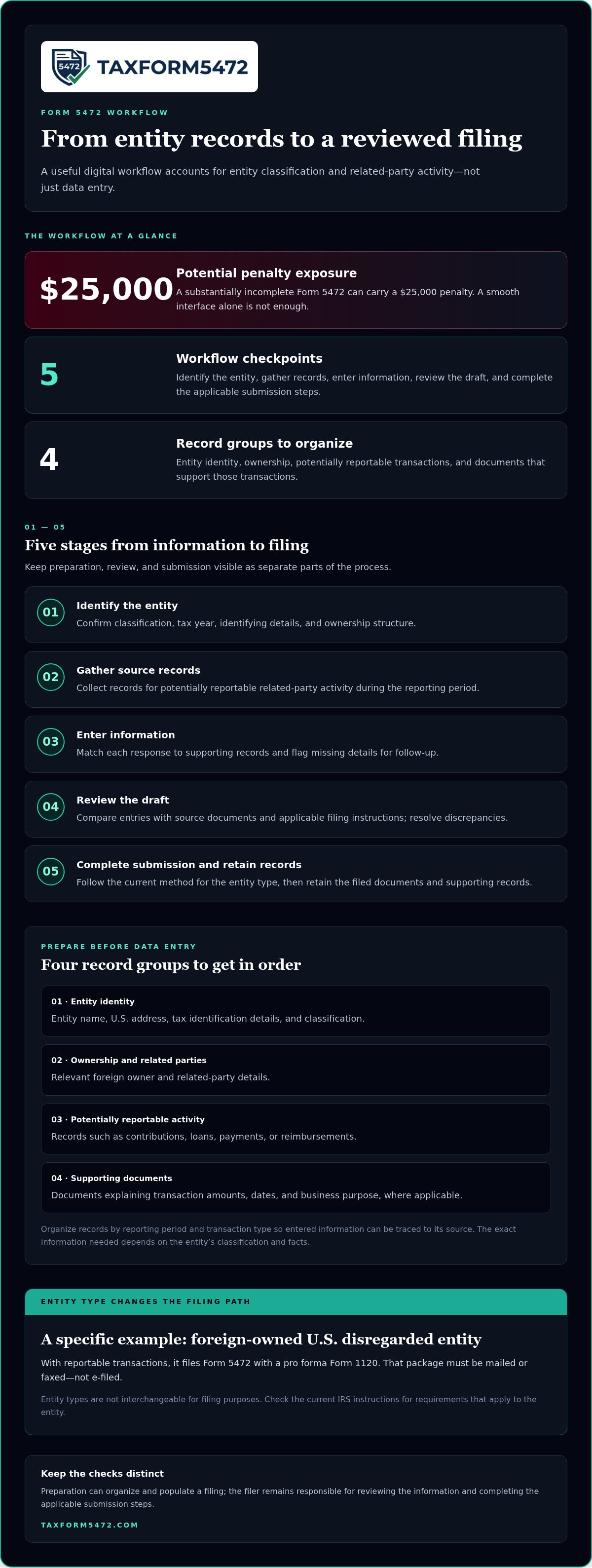
The most automated Form 5472 workflow isn’t always the safest choice. A digital tool for foreign-owned us entity form 5472 compliance must account for the entity type and related-party transactions, not just move data into fields. A substantially incomplete Form 5472 can carry a $25,000 penalty, so a smooth interface alone isn’t enough.
Choosing a tool is easier when you know what information to gather and what the workflow needs to support. Compare how clearly it handles your entity’s reporting needs, how easily you can review the completed form, and how you’ll retain filing records.
This guide compares dedicated Form 5472 tools, general tax software, and professional preparation. It explains which entity and transaction details to prepare, what workflow features to assess, and how to review a filing before submission. For foreign-owned U.S. corporations, TaxForm5472 offers a focused online Form 5472 preparation and filing service.
Key Takeaways
- Match the workflow to your entity structure, reportable activity, and filing steps.
- Prepare entity details and transaction records before entering information into a digital tool for foreign-owned us entity form 5472 compliance.
- Compare dedicated tools, general tax platforms, and professional preparation by their guidance, review support, and filing instructions.
- Review data handling and document access before uploading business records.
- A focused Form 5472 preparation workflow can help organize the required tax-document submission and review.
Why a Digital Form 5472 Tool Must Fit Your Entity’s Reporting Workflow
A digital Form 5472 tool organizes information, supports form preparation and review, and helps users follow filing steps. It can structure the work, but it can’t guarantee compliance or replace checking the entity’s reporting obligations against current IRS instructions.
Fit depends on more than whether a platform includes a Form 5472 screen. Entity classification affects which information and forms are needed, while reportable activity determines what transaction details to collect. A tool built around the wrong entity type or an incomplete picture of the activity can leave gaps, even if its interface is easy to use.
Understand what each system is designed to do. Bookkeeping software records financial activity, but may not guide users through Form 5472 preparation or filing. Broad tax-preparation platforms may cover multiple returns and workflows. A dedicated reporting tool focuses on Form 5472 and can make those steps more direct. Choose the category that fits the work your entity needs done.
Which foreign-owned entities should assess Form 5472 tool fit?
Filing obligations depend on entity classification and applicable reporting rules. A foreign-owned domestic corporation and a foreign-owned U.S. disregarded entity aren’t interchangeable for filing purposes. For example, a foreign-owned U.S. disregarded entity with reportable transactions files Form 5472 with a pro forma Form 1120. That package must be mailed or faxed, not e-filed. Review the IRS instructions for requirements that apply to your entity. The Form 5472 Wikipedia page also provides background on the form and its history.
What should a Form 5472 tool help you do?
A useful workflow supports collection of entity details and related-party transaction information, then separates preparation, review, and submission into clear stages. Check that the prompts fit your filing situation. For a broader overview of filing and automation considerations, see IRS Form 5472 Filing: 2026 Compliance and Automation Guide.
- Identify the entity: Record its classification, ownership, and other requested identifying details.
- Gather activity records: Organize records for potentially reportable related-party transactions, such as owner contributions, loans, service payments, or reimbursements.
- Prepare the form: Enter the relevant details and check that the workflow reflects the entity’s filing requirements.
- Review before submission: Compare the draft with source records and resolve missing or inconsistent information.
- Complete the filing steps: Follow the applicable submission method and retain the completed form and supporting records.
Preparation is not the same as submission. A platform may help create the form, while the entity still needs to review it and complete the correct filing process. Treat these as distinct checkpoints when assessing a digital tool for foreign-owned us entity form 5472 compliance. A focused workflow can reduce process friction, but the entity’s facts and filing requirements must guide each step.
How a Digital Form 5472 Workflow Moves from Information to Filing
A reliable workflow makes each stage visible. It shows what information is needed, where to verify it, and which filing steps remain. Labels matter: a process designed for one entity type may not fit another. Before entering data, make sure the tool’s prompts and submission guidance match your entity’s reporting situation.
- Identify the entity. Confirm its classification, tax year, identifying details, and ownership structure.
- Gather records. Collect source documents for potentially reportable related-party activity during the reporting period.
- Enter information. Match each response to supporting records and flag missing details for follow-up.
- Review the draft. Check entries against source documents and the applicable filing instructions.
- Complete submission. Follow the current method for the entity type, then retain the filed documents and supporting records.
Preparation support can organize and populate a filing, but the filer remains responsible for reviewing the information and completing the applicable submission steps. Treat preparation, review, and submission as separate checkpoints, not one automated action.
What information should users organize before starting?
Start with the details that establish which entity is filing and which reporting period applies. The exact data requested can vary, so use the current IRS Instructions for Form 5472 as your reference rather than relying on a generic checklist alone.
- Entity name, U.S. address, tax identification details, and entity classification.
- Ownership information, including relevant foreign owner and related-party details.
- Records of potentially reportable transactions, such as contributions, loans, payments, or reimbursements.
- Supporting documents that explain transaction amounts, dates, and business purpose, where applicable.
Organize records by reporting period and transaction type. This makes it easier to trace an entered amount to its source. Don’t assume every entity needs identical information. Confirm the requirements for the entity’s classification and facts using the applicable instructions.
Where should review and submission fit into the process?
Review the form after data entry and before submission. Compare names, ownership details, transaction amounts, and other entries with source records. Resolve discrepancies rather than relying on a software prompt to detect every issue. For more on identifying relevant activity, see Reportable Transactions Form 5472: A 2026 Compliance Guide.
Then follow the current IRS submission method for the specific entity. For example, a foreign-owned U.S. disregarded entity files Form 5472 with a pro forma Form 1120, and that package must be mailed or faxed rather than e-filed. Keep a copy of the completed form, submission evidence, and supporting records. An online Form 5472 preparation workflow can help organize preparation, while the entity still needs to review the form and follow the applicable filing instructions.
Digital Tool, General Tax Software, or Professional Preparation?
Compare the workflow each option covers, not just whether it mentions Form 5472. A dedicated tool centers on this form. General tax software may connect it with other filings. Professional preparation adds human review and judgment. None of these options removes the need to provide complete information and review the filing.
| Option | Entity fit | Guided data collection | Review support | Filing instructions |
|---|---|---|---|---|
| Dedicated Form 5472 tool | Focused on Form 5472; the workflow must fit the entity’s classification | May organize form-specific inputs | Review features vary | May guide form-related steps; the applicable submission method still matters |
| General tax platform | May support multiple entity filings | Can gather information across returns | Depends on the platform and workflow | May include broader filing directions; entity-specific steps still matter |
| Professional preparation | Can be suited to a range of entity facts | Information is gathered through the preparation process | Includes professional review, with scope depending on the engagement | Can provide guidance as part of preparation |
When can a dedicated Form 5472 tool be a practical fit?
A dedicated workflow can be practical when the task centers on Form 5472 and the entity’s facts fit the tool’s process. Guided steps may help organize ownership and transaction information without unrelated tax screens. taxform5472.com provides online Form 5472 preparation and filing for foreign-owned U.S. corporations.
Consider whether form-specific prompts help you provide the right information, identify missing details, and understand what remains for review or submission. A purpose-built tool can reduce process friction by keeping the task focused. It doesn’t determine whether every transaction has been identified, resolve uncertain tax treatment, or guarantee that a return is complete.
When might a broader or professional workflow suit the situation?
A broader tax platform may suit an entity managing several related filings in one system. It can centralize information, but the Form 5472 steps may be one part of a wider process. If ownership arrangements, transaction treatment, or entity classification raise questions, professional judgment may be useful. Software supports a workflow; it isn’t professional representation.
Choose based on the work at hand. A straightforward preparation workflow may call for a focused tool. Multiple filings may favor a broader platform. Questions that require analysis may call for professional preparation. For a closer look at trade-offs, see Form 5472 CPA vs. Software: Evaluating Compliance Risks and Costs.
The best digital tool for foreign-owned us entity form 5472 compliance is the one whose scope fits the entity, whose prompts support accurate information gathering, and whose review and filing guidance match the actual process. Compare those capabilities before choosing a route, then verify the completed filing against the entity’s records.
How to Evaluate Form 5472 Software Before Entering Business Data
Assess the workflow before uploading records. Check whether the software fits the entity, guides relevant data entry, supports a careful review, and explains the steps after preparation. It should make the process clearer, not imply that automation removes the need to verify information or follow filing requirements.
Use this checklist: confirm entity fit, relevant prompts, review controls, submission guidance, and clear terms for document access and retention.
Which workflow and review controls should users look for?
Start with the entity’s classification and reporting situation. Prompts should relate to the information needed for that filing, including ownership and potentially reportable transactions, rather than assume every business follows the same path. Clear instructions can help users identify what information to gather and which answers may need further review.
- Entity fit: Does the workflow identify the relevant entity type and filing situation?
- Guided inputs: Are questions specific enough to connect responses with source records?
- Review controls: Can users review and revisit entries before completing preparation?
- Next steps: Does the workflow explain what happens after the form is prepared, including the need to follow the correct submission method?
Look for a visible review stage, not just a final confirmation button. For example, if a transaction amount appears in the form, users should be able to compare it with the underlying record and correct an entry before moving forward. Software may organize information and flag gaps, but it can’t establish that every relevant transaction was provided or that each answer is correct.
How should users assess records and data handling?
Before uploading business documents, read the platform’s descriptions of document handling, access, and retention. Understand how users access submitted files, how long records remain available, and what happens to them after the workflow is complete. Review the platform’s published terms and controls. Don’t infer a security certification or specific protection from the presence of an online interface.
Prepare source records first. Organize them by reporting period and transaction type, then use them to support entries and review. This reduces avoidable searching and makes it easier to trace information to its source. Keep your own copies of submitted records and completed filing documents according to your recordkeeping process.
A digital tool for foreign-owned us entity form 5472 compliance should make its scope and next steps understandable. It supports preparation and filing, while the filer remains responsible for checking the details and completing the applicable process. Use the checklist to compare workflows before entering sensitive business data.
For focused online Form 5472 preparation, taxform5472.com provides a digital interface designed to facilitate required tax-document submission.
Use taxform5472.com for a Focused Form 5472 Workflow
Once you’ve assessed entity fit and gathered relevant records, a focused preparation service can keep the work centered on Form 5472. taxform5472.com provides online Form 5472 preparation and filing for foreign-owned U.S. corporations through a digital interface designed to facilitate required tax-document submission.
What to expect from a focused online preparation service
Provide relevant entity and transaction information through the digital interface. Organize the details using source records, and keep supporting documents available so you can check information as you work. A Form 5472-focused workflow keeps preparation tied to the reporting task rather than a broad set of unrelated tax workflows.
Preparation is one part of the process. Before completing the filing, review the information you provided against your records and check the current IRS instructions for requirements that apply to your entity. Entity classification and transaction activity can affect filing steps. A digital workflow doesn’t replace that review or determine whether every reportable item has been identified.
A practical starting point is to have the following ready:
- Entity information: Identification details, classification, and ownership records relevant to the filing.
- Transaction records: Documents that support related-party activity during the reporting period.
- Review materials: Source records you can use to verify the information entered during preparation.
- Filing guidance: Current instructions for the entity’s filing situation and submission method.
Organized records make it easier to move through the online process and catch inconsistencies before the form is complete. If a detail is unclear, resolve it using the source records and applicable filing guidance rather than relying on an assumption.
Start preparing your Form 5472 online
Begin with the records you’ve assembled and enter the relevant information through the online workflow. Review the prepared details carefully, then follow the applicable filing instructions. A digital tool for foreign-owned us entity form 5472 compliance can support a focused preparation process, while accurate information and careful review remain essential.
Start your Form 5472 preparation
Move from Tool Selection to Form Preparation
Make your next step practical. Once you’ve chosen a workflow that fits your entity, set aside the records you’ll use and begin preparation while the reporting period details are accessible. A suitable digital tool for foreign-owned us entity form 5472 compliance can keep the process focused, while your review keeps the information grounded in your records.
taxform5472.com provides online Form 5472 preparation and filing focused on foreign-owned U.S. corporations. Its digital platform facilitates submission of required tax documentation. Start when you’re ready to move from comparing options to preparing the form.
Start your Form 5472 preparation
With your records organized and the right workflow selected, you’re ready to take the next step.
Frequently Asked Questions
Can a digital tool file Form 5472 directly with the IRS?
Digital services may prepare the form, support filing, or handle different parts of the process. corporations. For a foreign-owned U.S. disregarded entity, Form 5472 is filed with a pro forma Form 1120, and the package must be mailed or faxed, not e-filed. An online workflow doesn’t necessarily mean the form is transmitted electronically. A digital tool for foreign-owned us entity form 5472 compliance should make its role in the process clear.
Does Form 5472 software replace a tax professional?
No. Software can organize information and support form preparation, but it doesn’t replace professional judgment on complex facts. For example, if it’s unclear whether a payment between an entity and a related party belongs in a particular reporting category, the software may not resolve the underlying tax question. Use professional advice when you need analysis of entity classification, transaction treatment, or how reporting rules apply to specific facts.
Can a foreign-owned single-member LLC use an online Form 5472 tool?
It may, if it’s classified as a foreign-owned U.S. disregarded entity and has reportable transactions with a related party. The required filing package includes Form 5472 and a pro forma Form 1120, submitted by mail or fax rather than e-file. The IRS provides no minimum transaction amount for this entity type. Review the current instructions and make sure the workflow addresses the entity’s filing situation before entering information.
What information should I have ready before using Form 5472 software?
Have the tax year, entity identification details, ownership information, and records of related-party activity ready. A transaction log can help: note each transaction’s date, amount, parties, and description, then link it to a bank record, invoice, loan document, or other source. Include owner transfers and reimbursements for review. The exact information needed depends on the entity and filing facts, so use current IRS instructions as your reference.
Is online Form 5472 preparation secure?
Security depends on the platform’s actual data practices. Before uploading records, review its privacy information and terms for how documents are accessed, stored, retained, and removed. Check whether account access can be limited to the people handling the filing. Avoid sending sensitive tax documents through an unverified channel. Don’t assume an online interface or a security claim means a particular certification or protection is in place.
What happens after I complete Form 5472 in a digital tool?
Review the completed form against your source records, then follow the submission method that applies to your entity. Save a copy of the final form and supporting documents. If filing by mail or fax, retain available evidence of transmission, such as a mailing receipt or fax confirmation. If the service handles a submission step, keep any status or confirmation it provides and track unresolved items until the filing process is complete.